2.0 Technical Guidelines
Technical guidelines are meant to include ways that web technologies are used to display and relate information. This includes best practices for code and markup to utilize the abilities of modern browsing devices while still accommodating older web browsers. It also includes methods of aggregating content, gathering analytics, and policies on privacy and security.
Technical guidelines are set by the georgia.gov Interactive Team, with cooperation and participation from the Georgia Web Strategy Working Group. Guidelines are not enforced, but are rather used as recommendations for best practices.
2.1 Code and Markup Guidelines
PSG Number: GM-14-005
Topical Area: Web Design and Development
Issue Date: 11/1/2013
Effective Date: 11/1/2013
Document Type: Guideline; Published (approved by Web Standards Group and GTA)
POC for Changes: Georgia.gov Interactive
Synopsis: Code and Markup guidelines for State of Georgia web sites.
2.1.1 Develop with Web Standards
It is important to develop with standards compliant code to ensure that it is compatible with the most web browsers and devices over a longer period of time.
The World Wide Web Consortium (W3C) provides technical documentation on standards, as well as free tools to assist you in developing standards compliant websites.
2.1.2 HTML / CSS
New websites should be built with HTML5 / CSS3 standards that are supported in modern web browsers, while using graceful degradation techniques to ensure that the sites still display sufficiently on older web browsers.
* Use analytics data to determine the older web browsers your site needs to support. If a web browser version is used by more than 3% of visitors, be sure all major content is still accessible using graceful degradation.
For more details on HTML and CSS, see the W3C Standards for HTML and CSS.
2.1.3 Javascript
Javascript may be used to enhance website content and design. DO NOT display main content with Javascript, as it may prevent search engines from ranking the content.
For more details on scripting, see the W3C Standards for Scripting and Ajax.
2.1.4 Frames
Do not use frames to display content.
Frames pose problems with usability, accessibility of the site to the visually impaired, and make it difficult for search engines to index the website. If an iframe is required for functionality, it should be titled with text that facilitates frame identification and navigation.
2.1.5 Definitions
graceful degradation - coding the site in a way that utilizes modern coding standards while allowing for old browsers to still render the page effectively. For example, you can provide CSS for multiple background images for browsers that support it, while also providing a single background image for older browsers that do not.
2.1.6 Resources
2.2 Multimedia Guidelines
PSG Number: GM-14-005
Topical Area: Web Design and Development
Issue Date: 11/1/2013
Effective Date: 11/1/2013
Document Type: Guideline; Published (approved by Web Standards Group and GTA)
POC for Changes: Georgia.gov Interactive
Synopsis: Multimedia guidelines for State of Georgia web sites.
2.2.1 Audio, Video, and Animation
Use video, animation, and audio only when they help to convey, or are supportive of, the site’s message or other content.
- DO NOT set audio or video to auto-start on page load or on mouse-over.
- DO provide manual controls to start, pause, and navigate through the multimedia element.
- DO support keyboard interaction so that users who cannot use a mouse can still control the function of the multimedia.
Please reference the Accessibility Standards on Alternates and Fallbacks for requirements on providing text equivalents to video and audio.
2.2.2 Flash
If at all possible, do not use Flash at all. Most things that used to require Flash to display can now be accomplished using CSS3, Javascript, or JQuery.
If you find it is necessary to keep a flash component on the page, it should be as a supplemental element. Be sure that any relevant content is also available in a text format.
As a best case scenario, use Javascript to check if a user’s computer supports Flash. If it does not support your Flash content, use Javascript to replace the Flash content with a text or image equivalent.
2.2.3 Video Hosting
We recommend using a 3rd party video hosting server environment that is tuned to hosting videos, and embed them on your website.
Hosting videos on your own servers is discouraged for a number of reasons, including the large file sizes and bandwidth requirements of video streaming / downloading. By hosting your own videos you will also need to create a number of file format types in order to make your video accessible to different operating systems and web browsers. Video hosting services are better tuned to the video storage and streaming, and are also set up to auto-convert video to a number of formats.
Recommended video hosting services include but are not limited to:
- YouTube
- Vimeo
- Brightcove (paid service)
* Note: When setting up an account for a third party video hosting service, be sure to use a generic, agency-specific email account that can be taken over by another user should you be out for any reason, or should someone else take over your role managing the content. Also be sure that your supervisor also has the login information to maintain business continuity.
2.2.4 Resources
2.3 Web Forms Guidelines
PSG Number: GM-14-005
Topical Area: Web Design and Development
Issue Date: 11/1/2013
Effective Date: 11/1/2013
Document Type: Guideline; Published (approved by Web Standards Group and GTA)
POC for Changes: Georgia.gov Interactive
Synopsis: Web Forms guidelines for State of Georgia web sites.
It is important to make online forms as user friendly as possible to ensure that visitors are able to complete the form process without complications. The more complicated or difficult a web form is, the higher the likelihood that a visitor will not complete the process. This can result in lost revenue, or an increase in phone calls and walk-ins to complete transactions that visitors would otherwise like to complete online.
The following is a guide to make your forms as usable and easy to complete as possible.
2.3.1 Linear Path
- DO keep form interaction linear, with no diversions or loops.
- DO lay out fields vertically (e.g., the “Last Name” field should appear below “First Name” instead of to the right of it).
- DO ensure that users can navigate forward and backwards in a multi-page form without losing their data.
- DO include a progress indicator for multi-page forms (e.g. “Step 1 of 3”).
- DO end the form with a clear Confirmation page that helps users know what to do next.
2.3.2 Readability
- DO keep text labels left-aligned to the left of the form input fields.
Text labels should not appear above the input field if possible, as that breaks up the flow of readability. Similarly, having form fields right-aligned to the left of the form fields creates a jagged left edge that breaks up the readability flow (examples in the article on Creating Usable Online Forms from Usability.gov). - DO use simple terms in labels; avoid using jargon that not all users will be familiar with.
2.3.3 Accessibility
- DO use HTML labels for form elements.
- DO use tabindex attribute controls to enable ease of keyboard-only navigation.
- DO use symbols to indicate required fields and error messages; do not simply rely on color for these indicators. (For example, use an asterisk to denote required fields, or the term “optional” to denote optional fields).
2.3.4 Usability
- DO perform functionality and usability testing on completed forms and applications to ensure that they behave as expected.
- DO describe the content type and other form attributes in your fields. e.g.:
type=email
autocapitalize=off
autocomplete=off - DO hide optional fields when possible - only include essential form fields.
- DO provide clear error messages and error indicators for fields that need correction.
- DO ensure that all other form fields remain filled in when an error message appears.
2.3.5 Resources
- Usability.gov: Creating Usable Online Forms
- Usability.gov: Online Form Development, Lessons Learned
- Web Style Guide, Designing Applications
2.4 RSS Feed Guidelines
PSG Number: GM-14-005
Topical Area: Web Design and Development
Issue Date: 11/1/2013
Effective Date: 11/1/2013
Document Type: Guideline; Published (approved by Web Standards Group and GTA)
POC for Changes: Georgia.gov Interactive
Synopsis: RSS Feed guidelines for State of Georgia web sites.
RSS stands for Really Simple Syndication. It is a web page format that allows visitors to subscribe to a section of your website using an RSS aggregator in order to be notified when new content is posted. Other websites can also syndicate and display your content as supplemental information, thereby giving your new content a wider audience.
2.4.1 When to Use RSS
RSS is ideal for content that is regularly updated, such as news, press releases, blogs, podcasts, and event information.
Georgia.gov syndicates Agency RSS feeds on its main topic pages for News and Press Releases. To have your Agency Press Releases posted on the Georgia.gov website, be sure your feed matches the appropriate RSS formatting below, and then open a Portal Support Ticket indicating that you would like your RSS feed to be added to the Georgia.gov website, and include the URL of your feed.
* Note for Portal agencies: RSS feeds are generated automatically for Press, Blogs, and Events in the Drupal CMS. Relevant RSS feeds on portal websites will be automatically added to the Georgia.gov website, so no support ticket will be necessary.
2.4.2 RSS Markup Formats
RSS is written in the XML markup language, and can take different forms depending on the content being syndicated. The most efficient way to keep an RSS feed updated is to have your Content Management System (CMS) set up to automatically update the RSS file when new content is published.
Follow the RSS 2.0 guidelines for formatting your RSS feed.
At minimum, your RSS feed should contain the following information:
<?xml version="1.0" encoding="iso-8859-1"?> <rss version="2.0"> <channel> <title>Title for your RSS feed</title> <description>Description of the RSS feed</description> <link>Your homepage URL</link> <language>en-us</language> <pubDate>Fri, 31 Dec 2011 21:00:00 EST</pubDate> <item> <title>Item title</title> <link>Full URL of item on website</link> <description>Short Description of item</description> <pubDate>Fri, 31 Dec 2011 21:00:00 EST</pubDate> </item> <item> <title>Item 2 title</title> <link>Full URL of item on website</link> <description>Short Description of item 2</description> <pubDate>Fri, 31 Dec 2011 20:00:00 EST</pubDate> </item> </channel> </rss>
* Note: <pubDate> shows when the channel or item was published. The date should be expressed in the following format: day_of_week, day_of_month three_letter_month_abbreviation year hour:minute:seconds timezone. Example: Fri, 31 Dec 2011 20:00:00 EST
2.4.3 Indicating RSS Feeds
When linking to an RSS feed, it is a common practice to use the RSS feed icon:
2.4.4 Glossary
RSS Aggregator: Also known as an RSS Reader. A program that allows users to subscribe to RSS feeds, which checks for new content and displays it within its interface. An example is Feedly (https://feedly.com/).
2.4.5 Resources
2.5 Analytics Guidelines
PSG Number: GM-14-005
Topical Area: Web Design and Development
Issue Date: 11/1/2013
Effective Date: 11/1/2013
Document Type: Guideline; Published (approved by Web Standards Group and GTA)
POC for Changes: Georgia.gov Interactive
Synopsis: Analytics guidelines for State of Georgia web sites.
2.5.1 Web Analytics Overview
Website analytics are a series of metrics that help indicate the popularity and success of your web site, as well as a series of user statistics that provide an overall picture of the devices, operating systems, and software your audience uses to experience your site.
Evaluating web analytics is the process of collecting, analyzing, and evaluating data that tell you how well your website is meeting its objectives, so you can make improvements. Analytics evaluation is not a one-time process; it requires an overall strategy of routine evaluation to determine how your audience changes over time, and how successful your site is as it changes or remains static over time.
2.5.2 Develop a Plan
You should develop an analytics plan and review and adjust it regularly. Ask yourself and key stakeholders these questions:
- What do you need to measure? What are your requirements?
- How will you measure it?
- What tools will you use?
- What methodologies are needed to gather the data you need?
- What will you do with the results?
- How will the results help meet the goals for your website and your agency’s mission?
- How does the plan fit with your agency’s overall strategic and performance plan? How does it aid in the goals of individual program offices?
2.5.3 Analytics Tools
There are a number of metrics to measure, and ways to gauge website effectiveness. Some useful tools for analyzing your website include:
Web Analytics tools such as Google Analytics, Siteimprove or Omniture will give a variety of metrics on your users, their hardware and software usage, time spent on pages, which pages they’ve visited, and what search terms they use to access your website.
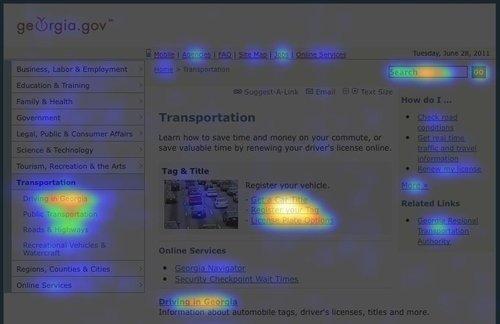
Eye Tracking tools such as Crazy Egg give you a graphic picture of where users are clicking on your page. This goes beyond standard analytics metrics to show you exactly what terms and graphics on the page are catching users’ eyes, and which parts of the page are being completely overlooked.
Customer Satisfaction Survey tools such as SurveyMonkey can be set to load a short survey as a user is leaving the website. You can use these to ask users 3 of 4 questions about their visit, if they found what they were looking for, and what it was they were looking for on your website. Surveys can be posted to schedule a survey to load after a certain number of minutes on a site.
Usability Testing can be accomplished on a low budget with simple tools such as FiveSecondTest to gather first impression usability feedback from testers to evaluate the effectiveness of a page layout or campaign.
2.5.4 Evaluating Website Effectiveness
Audience Analysis - Use a web analytics tool to gather a clear picture of your audience and its needs. Some things to measure and plan for include:
- Web Browsers - be sure your website supports the web browsers used by at least 95% of your users. Government websites should not prevent a user from accessing its information because they use an outdated web browser.
- Screen Resolution - understand the monitor sizes of your visitors to determine your strategy for web layout and dimensions
- Mobile - see what percentage of your traffic comes from mobile devices, and what content mobile users are looking for.
Audience Goals - You can also use analytics to determine what your users are looking for on your website, and to some extent, whether or not they were able to reach those goals. Some information to analyze includes:
- Most frequently viewed pages - helps to determine what people are looking at
- Terms visitors type into commercial search engines to find your site - helps to determine where you are succeeding in your Search Engine Optimization techniques (are people finding your site using the terms you would expect them to use?)
- Terms visitors type into your search box to find information on your site - helps to determine what information your users are not finding on their own, and often which topics are most important to your visitors.
- Top entry websites - who is referring visitors to you? (Where did your visitors come in from?)
- Bounce Rate - the percentage of single-page visits or visits in which the person left your site from the entrance (landing) page.
2.5.5 Utilizing the Data
Once you’ve gathered and evaluated your analytics data, you can use this to develop a clear plan for how to improve on your website. Some questions you may ask when analyzing this data include:
- Which web browsers should my website be tuned for? (Which browsers make up the top 95% of users?)
- What are the keywords I should keep in mind when writing content and setting up meta keywords? (see the SEO section for more on keyword strategies)
- Do I need a strategy for making my content more accessible to mobile users?
- What are visitors looking for? Do I need to update my content to better address these items?
- Do I need to make certain information more prominent to help visitors find it?
- Do I need to write new content to address topics my users are searching for? (For example, some state agencies have found that constituents go to their website searching for topics that are handled by federal or local agencies, so they will write content to address those topics and redirect constituents to the appropriate agencies.)
- Is my homepage geared toward the things my visitors want the most?
- Is the website meeting our Agency’s stated goals?
References
Resources
2.6 Mobile Guidelines
PSG Number: GM-14-005
Topical Area: Web Design and Development
Issue Date: 11/1/2013
Effective Date: 11/1/2013
Document Type: Guideline; Published (approved by Web Standards Group and GTA)
POC for Changes: Georgia.gov Interactive
Synopsis: Mobile guidelines for State of Georgia web sites.
Recent statistics show that mobile Internet growth is doubling every year. Global use of mobile devices accessing the Internet for January 2012 was 8.5% of total online usage (source). From these trends, estimates show that by 2015, more U.S. Internet users will go online through mobile devices than through PCs or other devices. This makes it increasingly important to make sure your website is mobile accessible.
Mobile Usage Statistics
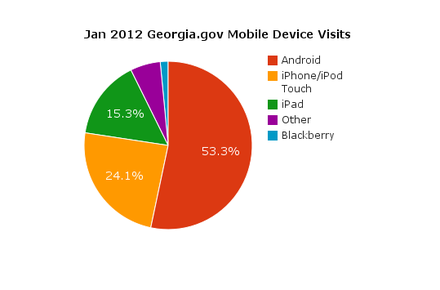
As a point of reference, the following is a breakdown of the mobile devices used to access georgia.gov in January 2012. This is for reference only, and statistics will change over time. Whenever possible, use your own current analytics information to help determine your target audience.
| Device | Percent |
|---|---|
| Android | 53.32% |
| iPhone/iPod Touch | 24.07% |
| iPad | 15.29% |
| Other* | 5.80% |
| Blackberry | 1.52% |
*Other includes Windows 7 devices, non-Android/iPad tablets, and any other mobile device that does not fall under the most common mobile devices.
2.6.1 Mobile Applications (Apps)
When talking about mobile accessible web content, it is common to consider developing mobile applications (apps) for the devices. When considering mobile app development, keep in mind the following factors:
- Each mobile phone platform requires you to develop a separate app. (For example, you may need an iPhone app, an Android app, and a Blackberry app depending on user statistics).
- Not all mobile phones with web access also support separate downloadable apps.
With these points in mind, it is important to weigh the factors before deciding whether to develop a mobile app, or to provide all the necessary information from a mobile-compatible website.
DO NOT develop an app:
- When the app will just repeat content and features available from your website
(For example, an app that just has screens of text, bullet lists, or images). - When you have a low budget
- When only a small subset of users will need the functionality
- When the user will only need to use the app once a year or less.
(For example, drivers’ license renewal should be available as a form that functions well on the mobile website, not built as a separate app that users only need once every few years).
DO develop an app:
- When the functionality required will utilize the mobile device’s hardware (for example, if it relies on GPS, photo capability, phone functionality, etc.).
- When the available mobile browser software limits your abilities to perform necessary functions.
- When the user needs to be able to access the information offline (without a data or Wi-Fi connection).
- When you have the necessary budget to develop the app functionality on all major smartphone platforms, as well as the budget to advertise the app to make people aware of its availability.
See 2.6.5 Case Studies below for examples of good mobile app usage and good use of mobile websites.
2.6.2 Mobile Websites
In many cases, you can make all your information and services available to mobile users by tuning your website to be mobile accessible.
DO NOT remove web content from the mobile version.
Ensure that users can perform all the same functions on the mobile site that they can perform on the website, including access to all information and access to creating and managing user accounts on applications.
If there is any content that you think should not be available on the mobile version, ask yourself it it needs to be on the website at all. This extraneous information may need to be removed from the website altogether if you’ve identified it as information that users with a mobile device would not find useful. Similarly, a mobile user should not be expected to switch to a computer’s web browser in order to access some of your site’s content.
Consider a Responsive Design or Adaptive Design technique when developing your website.
Rather than designing, developing, and maintaining a separate Mobile version of the website, consider using a Responsive or Adaptive design technique for your main website. In each design strategy, the same website is tuned using CSS and Javascript to display content in a different layout based on the screen resolution of the device. The same website will have a different layout on a 320px wide device than it will on a tablet that is 800px wide, and again will have a different layout on a desktop with a 1200px screen width (with different device “breakpoints” depending on your layout needs).
All the important content should still be available, but using analytics you can determine which elements are more commonly needed by mobile users. Those elements should be positioned at the top of the screen, while less commonly used items would be further down.
* Note: The Georgia.Gov website is built using responsive design geared towards providing a beautiful and easy-to-use experience customized to mobile, tablet, and desktop device breakpoints. Portal agency templates are not responsive, however they have been built using web-kit mobile-friendly techniques and technologies that performs well on iOS and Android smartphone platforms, allowing the smartphone browsers to fully render those websites utilizing the smartphone’s built-in scaling technologies. The development also avoids Flash and other processor-intensive client-side technologies to allow these sites to perform well across a wide suite of mobile devices.
Graphic Considerations
When developing a website that will be available for mobile and desktop users, consider mobile bandwidth restrictions and be sure to tune your images, fonts, and other bandwidth-intensive elements to be able to load quickly on a mobile device. Whenever possible, a smaller version of each should be available for mobile and tablet devices than what will be downloaded for a desktop or large screen device. At times, you may decide that certain decorative graphic elements don’t need to download and appear at all on the mobile version.
You may want to consider using server-side feature detection scripts to determine the image sizes, fonts, videos, etc., to serve to the site depending on the visitor’s device. When used in conjunction with a Responsive Design solution, this is referred to as RESS (Responsive Design + Server Side Components).
Mobile First
When planning a website redesign, it can be helpful to plan using a Mobile First mindset. In this strategy, you begin by designing and developing the content, layout, and functionality based on what would be necessary for a mobile user. From there you can adjust the design and layout for desktop and large screen devices.
2.6.3 Usability for Mobile Devices
Keep in mind that mobile users will likely be using their fingers to navigate their screen. Design mobile apps and websites with large touch targets and, when reasonable, gestures and finger swipes as well.
When selecting colors and contrast, keep in mind that some portable devices are black and white, and also consider that users may be outdoors with a glare from the sun. Your designs should maintain a high degree of contrast for these considerations.
Minimize the need for typing interactions. For form fields, be sure to apply the appropriate content type attributes (e.g. <input type=”email”>) to enable input type-specific keyboard displays. (For example, on an iPhone or iPad, the keyboard displays an @ symbol in the common keys area when type=”email” and it switches to display a number pad when type=”tel”).
2.6.4 Testing Websites for Mobile
When designing and developing for the mobile web, the idea of testing functionality on multiple mobile devices can get overwhelming. While it is necessary to test your design and development on mobile devices to ensure that your website translates appropriately to mobile, it’s not feasible to acquire and test on every type of mobile device available to users. We recommend taking a balanced approach.
Code Validation
A good first step to testing your website for compatibility is to actually check it’s mobile-friendliness using a validator such as the W3C mobileOK Checker or MobiReady. Once you’ve resolved any issues that arise in the validators, you are ready to move on to testing on devices and emulators.
Testing on Real Devices
The vast majority of mobile web users are currently on an iOS or Android device. This means it’s most important to “get it right” on those devices, so testing for them should be done on the devices themselves. There will be behavioral nuances that can only be caught on the devices themselves. If at all possible, you will want to test on the following mobile and tablet devices:
- iPhone (newest iOS version)
- also test using Opera Mini
- iPod touch (one iOS version behind current)
- iPad
- Android phones (various manufacturers and versions where possible).
Test on the stock browser, as well as the following browsers: - Android tablet
- Kindle Fire - this eReader now has a web browser built in as well
Testing Using Emulators
To test how Responsive and Adaptive breakpoints translate to different device sizes, as well as general mobile behavior testing, Mobile Emulators are a good backup testing resource. They still won’t compare with the real devices, and may have their own glitches. However, testing using emulators is preferable to skipping mobile testing altogether. Use your analytics data to determine which devices are the most popular, and test for those. A comprehensive list of mobile emulators is available at MobileExWeb.
2.6.5 Case Studies
Ready GA iPhone App
GEMA’s iPhone app provides localized Emergency alerts, maps for shelters in case of an emergency, and a number of emergency tips. Its use of geolocation for alerts and shelter location, as well as its offline availability for tips and checklists makes this a prime candidate for a mobile App.
CA.gov Locator iPhone App
This mobile iPhone app for California residents uses the device’s GPS functionality to help constituents locate government services near them, such as libraries, parks, and DMV offices.
Utah’s State Parks Field Guide iPhone App
Utah’s State Parks iPhone app uses the phone’s geo-location services to enable users to find parks nearby, and also provides static maps that users can access when they don’t have phone or Wi-Fi service. These two features make it a prime candidate for a mobile app instead of just referring users to a mobile website.
Fishing Spot Mobile Website
Rather than develop a device-specific app to browse for fishing spots, California’s Department of Fish and Game developed a mobile website that uses large touch-click areas and a mobile style interface to display all the relevant information within a mobile device’s web browser.
Smithsonian Institution’s Collection Search Mobile Website
Again, rather than develop a specific app for existing website functionality, the Smithsonian developed a mobile-friendly web interface for users to search or browse images of their entire collection online.
2.6.6 References
- W3C Device APIs working Group
- Mobile First Presentation
- Bridging the App Gap
- Mobile App Usage statistics
- Mobile Only statistics
- Multi-Device Web Design
- RESS: Responsive Design + Server Side Components
- Test on Real Mobile Devices without Breaking the Bank
2.6.7 Resources
2.6.8 Revision History
11/29/2012 - Removed 2 broken links from "References" section. Updated Testing to list nonspecific iOS versions.
06/02/2015 - Removed broken links from "References" section.
2.7 Privacy and Security Statement
PSG Number: GM-14-005
Topical Area: Web Design and Development
Issue Date: 11/1/2013
Effective Date: 11/1/2013
Document Type: Guideline; Published (approved by Web Standards Group and GTA)
POC for Changes: Georgia.gov Interactive
Synopsis: Privacy and Security guidelines for State of Georgia web sites.
Georgia.gov websites are designed to make it easier and more efficient for Georgia citizens and businesses to interact with their State Government. Georgia government strives to provide online resources in a safe, secure manner that respects your privacy when you visit our sites. This privacy statement addresses the collection, use, disclosure, and security of information that may be obtained by the State of Georgia when you visit Georgia.gov websites.
2.7.1 Information Collected
If you visit a Georgia.gov website, the State may collect some or all of the following information:
- The name of your domain; for example, "xyzcompany.com" if you use a private Internet access account;
- An IP address; a number automatically assigned to your computer when you are using the Internet;
- The type of browser and operating system used to access our site;
- The Internet address of the website from which you linked directly to our site;
- The pages you visit within the portal; and
- The links made to other websites through this site.
This information is collected for statistical analysis using third-party or proprietary software programs to create summary statistics. The statistics are used for the purpose of determining what information is of most and least interest to all visitors and identifying system performance or problem areas in order to better plan future portal enhancements. This information is not collected for commercial marketing purposes.
If, during your visit to a Georgia.gov website, you voluntarily provide personally identifiable information, we will collect such information. Examples of personally identifiable information may include:
- Your name, address, or phone number;
- An e-mail address if you are communicating to us through e-mail;
- Information you voluntarily submit to the State of Georgia for the purposes of completing or submitting an application or form online;
- Other information volunteered, such as vendor profile/contact information, survey information or content of e-mail.
In general, please note the information collected, whether or not personally identifiable, is not limited to text characters and may include audio, video and other graphic formats you send us. Information is retained and used in accordance with existing laws, rules, regulations, and other policies.
2.7.2 Use
Depending on the specific service or transaction, the State of Georgia may share personally identifiable information amongst its agencies in order to provide such service or complete such transaction.
Public Disclosure
As a general rule, we will not disclose any personally identifiable information collected online to entities outside of State of Georgia departments and agencies except where you have given us permission, or where the information is public information under the Georgia Open Records Act O.C.G.A. 50-18-70 et seq., or other applicable laws. Visitors should be aware that information collected through a Georgia.gov website may be subject to examination and inspection, if such information is a public record or not otherwise protected from disclosure.
Cookies
Georgia.gov websites may occasionally use "cookies" to customize your browsing experience. Cookies are simple text files stored by your web browser and they provide a method of distinguishing among visitors to the websites, and allowing customized features such as a "shopping cart" feature for online purchasing. Cookies created on your computer by using our websites do not contain personally identifiable information and do not compromise your privacy or security. You can refuse the cookie or delete the cookie file from your computer at any time by using any one of a number of widely available methods.
2.7.3 Security
Several tools, policies and protocols are used to safeguard the submission of information through Georgia.gov websites. Security measures have been integrated into the design, implementation and day-to-day operations of the entire operating environment as part of our continuing commitment to the security of electronic content as well as the electronic transmission of information.
For services requiring online financial transactions, Georgia.gov uses the Secure Sockets Layer (SSL) encryption protocol to safeguard your sensitive personal information, including your credit card number. Information is encrypted from your computer to the Portal computer processing your request.
In order to further secure your privacy, do not divulge any passwords or sensitive information (e.g. credit card number) to anyone in a phone call or e-mail. When you are finished with those applications that are password protected or required the input of your credit card information, it is always recommended that you close or otherwise exit the browser page.
E-mail is not a secure form of transmission. Georgia.gov does not recommend that you submit sensitive or personally identifiable information via e-mail. If you choose to provide us with personal information in an e-mail we may use the e-mail and the information contained within it to improve our service to you or to respond to your request. Sometimes we forward your e-mail to other State employees who may be better able to help you, and this staff may be employed by a different agency within the State. Except for authorized law enforcement investigations or as required by law, we do not share our e-mail with any other organizations outside of the public sector.
2.7.4 Changes to this Privacy Statement
Revisions to this Privacy Statement will be posted to this location so that you will know the type of information we collect and how that information is used. We will also post the last date of revision at the top of this page.
Our goal is to provide a private, efficient and friendly digital government experience. Please note that agency sub-portals and/or specific pages may contain additional or different privacy statements.