The Content Strategy Playbook
The How-To For Planning, Creating, And Managing Content
Your site was designed with usability in mind. It's responsive, accessible and attractive. But ultimately, it's up to you and your agency to manage it. How do you provide content that effectively reaches and meets the needs of your audience as well as your own? We want your site to be successful, so we've put together this guide on how to plan, create and manage your greatest digital asset, content.
What is a Content Strategy?
A content strategy is a high-level vision that guides content creation to deliver against both user goals and a business objective.
In other words, a solid content strategy makes sure that the audience goals and business goals are both met. Many state agencies don't stop to think about their goals when creating a site. Your audience wants information from you, but what do you want from your audience?
A content strategy:
- Supports Business & User Goals
- Reinforces Brand & Marketing
- Influences Design & Functionality
What is The Content Strategy Playbook?
The Content Strategy Playbook was designed as a handbook for content managers on GovHub. It's a best practices guide to help you manage your day-to-day content planning and delivery while keeping the big picture in mind.
Learn how to:
- Define your goals and your brand
- Learn about your audience
- Determine what type of content you need
- Schedule content
- Update/repurpose content
- Write for SEO & accessibility
- Use social media for engagement
- Measure success
Resources:
Empathy
Map
Who Are YOU?
Defining who are you are as a brand is the first crucial step to implementing a content strategy. If you have not already done so, start with a basic statement of the type of business you are in, the type of customers you serve and how you serve them.
Your Brand
Logos & Trademarks
A logo is a symbol that represents your organization. Sometimes, companies place so much weight on their trademarked images, they run the risk of over branding themselves. If branded content overshadows your goal of engaging, educating, storytelling or building relationships, you could lose your audience.
If your agency uses a branded logo or character, please ask yourself:
- Does my branded logo reflect my organization?
- Does my logo or character exclude any group?
- Is it clear what Georgia government department my agency belongs with?
- If it were not for my logo, would people still know who we are based on the content provided?
Keep in mind, while logos help with brand identity, most people who come across your site in search of a solution aren’t paying too much attention to themed images or logos.
Tone of Voice (TOV)
When producing content, your Tone of Voice (TOV) is how you speak to your audience. The goal of using a TOV is to instill a “feeling” when your audience reads your content. Are you writing to gain empathy, authority or credibility? Perhaps you use humor so that your story is entertaining or people can relate to you. If you are writing for the general public, you may decide that it’s fine to casually address the audience as “you.”
If you currently do not have a TOV guideline, here’s a quick and easy way to create one:
- Take a look at your existing content.
Everything — including white papers, press releases, e-books, blog articles or social media posts counts as content. What is the overall tone you have been using? Is it a tone you want to keep or modify? Choose examples of the brand voice you’d like to embody. - Describe your brand voice in three words.
If your brand were a person, how would you describe its personality to someone? (If you don’t already have an established TOV, how would you like to be perceived?)
Let’s use Consumer Ed again as an example. Consumer Ed wants to address your everyday consumer in Georgia. Their goal is to establish a kind of down-to-earth credibility. For Consumer Ed, let’s use these three characteristics as an example:
1. Trustworthy
2. Personable
3. Informed - Create a brand voice chart.
A brand voice chart quickly offers a reference on how you will speak to your audience. Take your three brand personality characteristics and put them into a table. Further describe each characteristic and include a tactical “Do” and “Don’t” column for each.
Brand Voice Chart (Example From Consumer Ed)
| Voice Characteristic | Description |
|---|---|
| Trustworthy | We are a trusted friend with a voice of reason when it comes to looking out for our readers' best interest. |
| Personable | We are down-to-earth and approachable. Go ahead, no question is too silly. |
| Informed | We're going to give you the straight dope and use an active voice to keep things brief and to-the-point. We make it easy for you to find the tools you need to make informed choices. |
Goal: Establish Credibility
|
Yes

|
No

|
|---|---|
"We're close friends with the Georgia Department of Law. So send us your question regarding a consumer-related issue in Georgia and we'll post a reply for all to see on our site." | "Do you have a question concerning a consumer-related issue? Want to know whether a certain practice by a business is legitimate? Wondering what your rights are? Do you suspect an offer you received might be a scam? Just submit your question to Consumer Ed by filling out the form below. While we cannot respond directly to individuals, you can read answers to select questions here." |
| "We're here to answer your questions about major purchases in Georgia." | "The Georgia Department of Law's Consumer Protection Unit has designed this website as a comprehensive resource to help you make wise decisions." |
| "Watch out for high interest rates when financing a car through the dealership. Try comparing rates with banks or credit unions for the best loan terms." | "Although you can conveniently get financing through the car dealership, the price you pay for that convenience is typically a higher interest rate. To get the most favorable loan terms, your best bet is to arrange financing through your bank or credit union before going to the dealership." |
Your Web Content Style Guide
Content style guides ensure consistency in grammar, style, tone and punctuation for your site. Having uniform experience in these things gives your readers a sense of familiarity and allows them to focus on your message.
Most writing on the web uses the AP (Associated Press) Style Guide, which tends to be brief with simple punctuation. The Chicago Manual of Style (CMOS) on the other hand, is generally characterized by longer, more complex sentence structures found in printed works like books. We suggest the AP style guide for your content as a basis.
Using an editorial style guide is a good foundation. However, you may need to take it further for your brand. If you manage writers or have more than a couple of people contributing to your site’s content, it’s good to have content style guide specified for you so all content contributors can write with the same style and TOV.
If you are not sure where to start, below are some iconic examples of well-defined style guides:
- MailChimp’s Content Style Guide
MailChimp’s content style guide, designed for MailChimp’s writers but offered as a public resource, is famous among content strategists and web writers. They invite you to use their style guide for internal purposes, so borrow parts you like and add other parts you may need relating to your agency. - Drupal
Drupal’s open source platform has helped millions manage their content. Their content style guide is also open for anyone to find inspiration or build upon. They do a great job of communicating and standardizing Drupal-specific terms.
When writing for the web, keep your sentence structure simple. Not only is it less annoying to scan through, the Plain Writing Act is actually a law required by federal government sites. If you are not sure your language is clear and simple enough, you can use a great tool called the Hemingway App. As you type, it keeps your writing in check by highlighting run-on sentences or blocks of text that may be confusing or too long.
Who Is Your Audience?
Understanding your audience is a key component in deciding what kind of content you serve and how you serve it. Sometimes it’s not always obvious, and other times your audience may shift.
Companies with large budgets often hire market research firms to create personas for their business. They use empirical research (data-based) by conducting usability testing, surveys, analytics, field studies and interviews.
You don’t have to hire a large market research company to do your own nonempirical research (assumption-based.) Take advantage of existing knowledge to benefit from a user-centered focus on content. As long as your nonempirical research is built on real cases, consumers or readers, you can have some success at creating your own personas for your agency.
Basic Demographics
For basic demographic research on the people who visit your site, you can use Google Analytics. Google Analytics offers some general information about the visitors on your site, including:
- Age
- Gender
- Location / City
- (As a state agency, your audience ideally lives in Georgia or plans on moving to Georgia.)
- Interests
Read more about how Google acquires demographic data on Google’s support page.
Other basic demographic data about your readers (should you take an educated guess) may include:
- Lifestyle
- Education
- Household Income
Have Empathy For Your Audience
Once you have a basic idea of your audience’s demographic, dig a little deeper to get in their head. One simple tool to capture a persona snapshot is called an empathy map. An empathy map is designed to help you predict a person’s needs based on how they think and feel, what they see and hear and ultimately, what they say and do (Be aware that what people say and actually do is often different.)
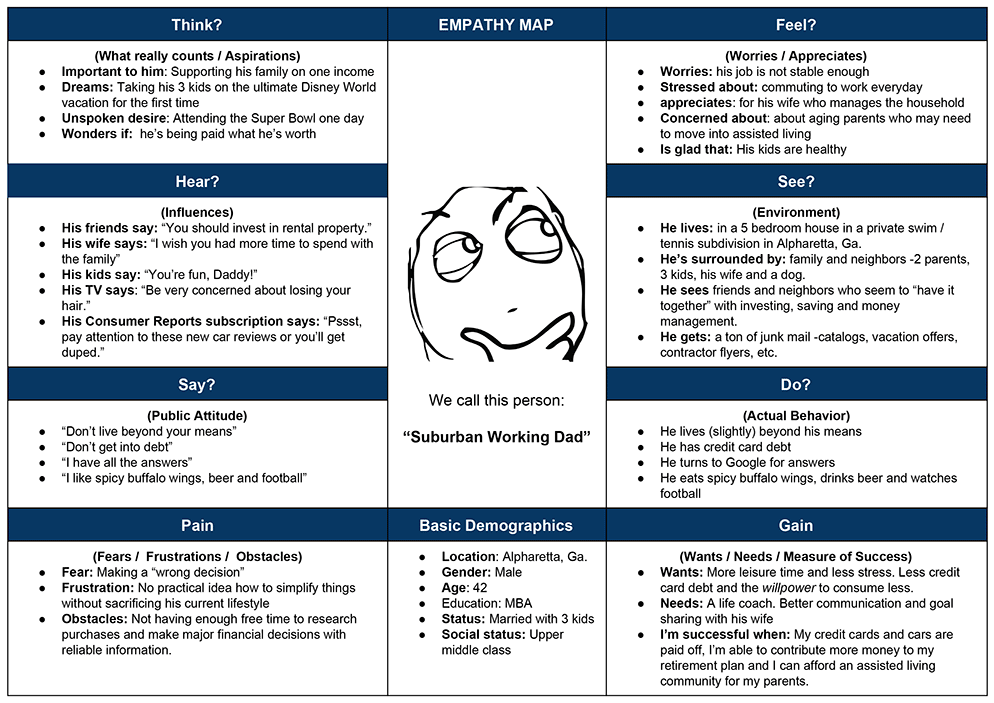
Humans are complicated. While you can’t expect to peg a “type” exactly, you can certainly get a big picture of common situations shared by thousands of people. Use this Empathy Map Template to create as many personas as you need based on the users you already know and have visiting your site.
As you create personas for user groups, think about the following:
What Does Your Audience Value (and Fear?)
On Consumer Ed’s site, people are posting questions based on what they value and fear. Take a look at the kinds of questions consumers ask when they contact you and sort them into groups. For example: John Doe posted a question about who is liable for fraudulent transactions using credit cards with the new chip and pin technology. John values his security and may be fearful of theft or identity theft. Jane Doe posted a question about grocery stores selling expired food products. Jane values her health and may be fearful of getting sick.
What Does Your Audience Want?
Based on values and fears that govern most human decisions, everyone has a problem they are trying to fix. All your readers have a story and a problem, and your job is to provide content that delivers a solution. Based on your various personas, aim to discover what answers your user groups seek.
What Type of Content Should You Provide?
Type of content refers to anything from blog posts, white papers, annual reports, site pages, web forms, multi-media or just about anything you publish on your site.
On Digital Services Georgia’s web publishing platform, you have the option to add various content types. You can find a list of content to add by going to the Add Content tab.
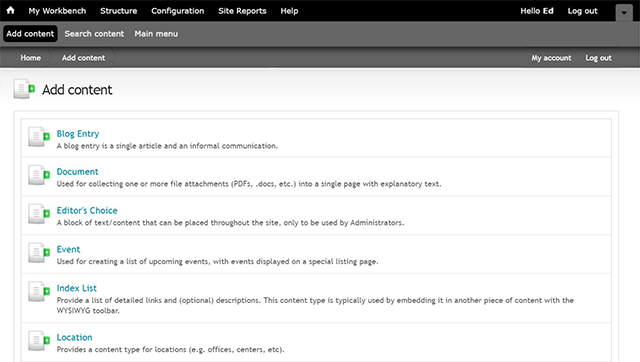
Your Site Content Defined:
Blog Entry (Ed’s Questions)
Blog entries are generally used for content or information that you plan on updating regularly. A good example is the Digital Services Georgia Blog, where you will find various blog entries written to help agency content managers. Not every agency needs a blog. In fact, the cold truth is: not many people care about reading blogs — especially if you are not providing information they absolutely need. If you choose to have a blog on your site, have a clearly defined theme and be consistent in publishing content. (More on that later.)
Document
This allows you to store a document (PDFs, Word docs, Excel sheets, etc.) to your site only if you absolutely need to. Please keep in mind that it can be annoying to click on a link and find out that you have just downloaded a PDF. If you are linking to anything but an html webpage, please let your users know. Also, in most cases, if it’s worthy of being a PDF, it’s also worthy of being a Site Page, Web Form or Press Release. For site load speed and best practices, we strongly recommend limiting the number of PDFs and other Office files.
Please keep in mind that your website is not designed as a place to store documents. The best way to display information is by using site pages.
Editor’s Choice
This is a box of text or other content that is generally placed on the homepage. (This is only used by administrators.) It could be used for an important announcement, recent news or any information that needs to be front-and-center, whether it’s permanent or temporary.
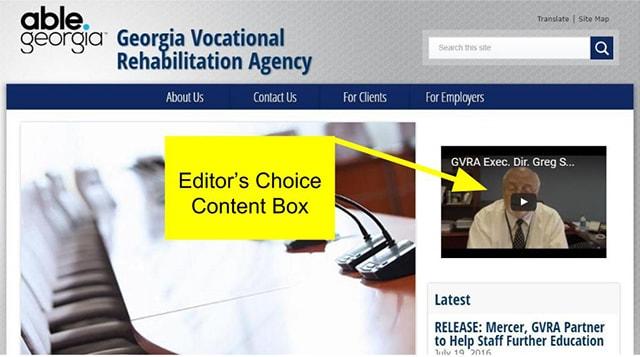
This video on Georgia Vocational Rehabilitation Agency is an Editor’s Choice content block.
Event
For agencies that host events such as Lunch & Learns, training sessions or any other public function, the events module is where you post it. Events are displayed on their own listing page and allow readers to see what’s coming up, where and when.
Index List
An Index List is a page with a detailed list of links that anchor to other pieces of content on the same page. An example of an index list is the Glossary page from Digital Services Georgia. When you click on a question, it takes you to the section of the page with the answer.
Location
If your agency has multiple offices or centers, you can use the location module. The Department of Labor is a perfect example of when to use the location module. They have a list of locations under: Contact Us > Find a Career Center.
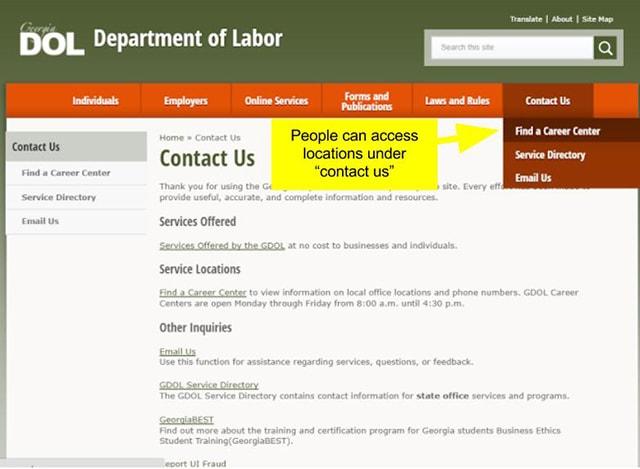
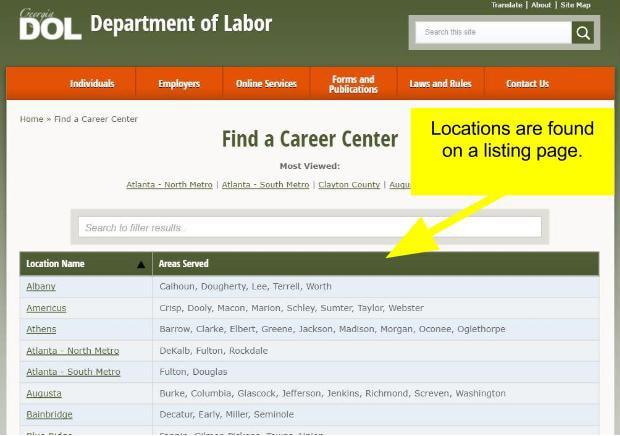
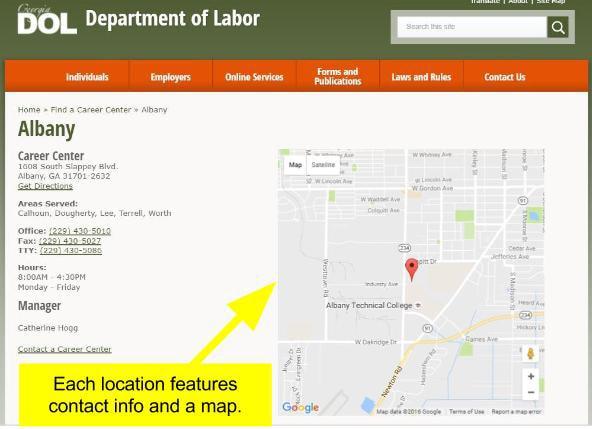
Photo Gallery
If your site relies heavily on images, you can upload them here if you’d like. Make sure images are resized correctly and optimized for best results.
Press Release
A press release is a brief, official statement issued to the media with the goal of piquing interest in order to get coverage or “press.” Not every bit of news needs to be a press release. If you don’t intend on targeting members of the media or the news is not compelling enough to garner attention, reconsider this content type. You may decide that your news may be better served as a blog post, tweet or maybe an article (site page.)
If you do use this content type, your press releases will live on a listing page and can be arranged by date. (Keep in mind that readers rarely browse old press releases.)
Profile
You can set up profiles for various content editors. This is handy if you have more than one person updating the content or contributing to a blog and you want to display their bio.
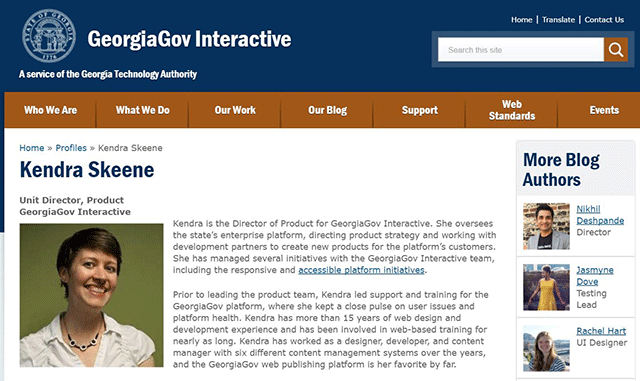
This is the profile page for our Unit Director, Kendra Skeene. Her profile can be seen alongside her blog posts with a link to a brief bio.
Site Page
A site page is any web content used for static information. This could be information about one of your agency’s services, programs or other helpful content. All your main pages are site pages. For Consumer Ed, pages that explain general consumer issues like Identity Theft, How to Buy a Used Car or How To Get A Credit Report, site pages are your go-to content type when posting these article pages.
Video
We do not host videos on our platform. Instead, use a third party service like Vimeo or YouTube and embed the code directly on the page you want to feature the video. There are a few reasons hosting your video content on Vimeo or YouTube is actually beneficial for your agency. One of them is the SEO value and social-sharing benefit. Video has become a standard in content strategy as most people today expect to find videos on any subject they want to learn about. You don’t have to pay for an expensive film crew, and you don’t have to have lengthy content to get video on your site.
Webform
Forms are great for getting specific information from your visitors. They are also often used as a way for visitors to contact you without having to see your email address. You can have as many forms as you want on your site. For Consumer Ed, a web form is used to ask Ed a consumer question.
If you want people to use your webforms, follow these tips:
- Unless users are logged into an SSL (Secure Sockets Layer Network,) don’t ask for sensitive personal data such as Social Security numbers or credit card info.
- Keep the form brief and specific so you don’t lose the audience’s attention.
- Only make the from field *required* if the information is truly needed to process the form.
If you ask for too much information that you don’t need, users may leave the page or worse, lose trust in you.
Dos and Don’ts of Web Content
Do:
- Include Multimedia
Consider the value of ALL kinds of content (including images, audio and video) when it’s relevant to the topic and adds value to the information. Make sure your multimedia follows best practices for accessibility. For more information on this, read our blog article on how to make your multimedia accessible. - Embed Content
Not all content has to be hosted on our platform. If you have a YouTube channel or slideshows hosted by Google or another site, you can grab some code to embed them in a page or post.
Don’t:
- Copy Content (Even if you credit the source)
Google punishes redundant content. Taking an article from another source and pasting it on your site is hurting both of your search results. - Provide Too Little Content
One page with two links is not worth a page. See where those links would already be relevant and useful and put them there. - Provide Too Much Content
Don’t overwhelm people with too much information on one page or post. For example, if you have a 5-page article on how to buy a new home, consider 5 separate blog posts according to steps. Break it up on smaller pieces that can be easily navigated and digested. - Rely On File Attachments
PDFs are large files and should be kept to a minimum. When possible, provide text in html format. Same thing goes for Excel files and Word documents.
How Often Should You Provide Content?
This varies widely depending on the government agency. How much new information do you have to share? How much new information can you find to share? Of course, how much content you provide heavily relies on how much time you are able to devote to the task — given all your other responsibilities. Be realistic but as a general rule, post new content as often as you possibly can.
Schedule Content
Being consistent is the key to creating and managing content effectively. One way to make sure you are consistent is to stick to an editorial calendar. An editorial calendar is a blueprint for keeping you on track of articles, blog posts, reports or anything else you plan to publish on your site. In short, it’s a place to map out what is going to be produced, when and by whom. Editorial calendars are usually planned out for the next 3-6-9 months and in some cases, even a year ahead.
Some helpful information to keep in the heading of your spreadsheet:
- Deadline / publication date
- Content type (blog post, email newsletter, guest article, etc.)
- Topic
- Author(s) / editors / approvers for submission
- Target audience
Brainstorm Ideas For Content
It takes some foresight and effort to craft a content plan for your editorial calendar. If you plan on maintaining a blog with some consistency, you need to schedule a brainstorming session. Come up with article ideas that fit your agency and your audience. Timing is important. If you run the blog for the Georgia Department of Transportation, for example, it’s helpful to know when hurricane season is to share emergency plans or when big events are expected to clog up traffic in different areas of Georgia.
There are two breeds of content:
Seasonal Content
Seasonal content refers to topics that are created and influenced by the time of year. Holidays, back-to-school time or tax season are examples of timing that could inspire article or blog ideas. Taking into account the season when creating and planning content is necessary for your editorial calendar. Leveraging seasonal search terms helps you deliver the right content at the right time — the fundamental law for an effective content strategy.
Evergreen Content
Evergreen content refers to material that is relevant or needed all year round. Child support laws, consumer news regarding identity theft and statistics for businesses relocating to Georgia are all examples of evergreen topics. Evergreen content makes up the bulk of your website. Case studies, how-to guides, white papers and site pages describing your services are all evergreen content types.
Update Content
The article that imaginary Bob wrote in 2014 about the top 5 Georgia exports is evergreen content that needs updating. Anyone can search for “top Georgia exports” at any time. However, if they come across an article that is 3 years old, they are not likely to trust it and move on because a 3-year old blog post is considered old news in Google land. The top 5 exports may have changed. But even if the exports have remained the same, the published date is a dead giveaway that the information has not been updated. Credibility is compromised.
With your evergreen content, you may already know which posts or topics have been most successful. Refreshing evergreen blog posts with new information or material is a great way to keep the fire burning with content that has already performed well in the past. (School textbooks update content almost every year. They update the content with new, timely examples, and increase the price.) When updating evergreen content, stay focused on tutorials or tips that will be relevant for a long time.
Repurpose Content
Repurposing content is finding multiple ways to reuse a successful article or blog post (keyword: “successful.”) If you find that one of your blog posts is showing up in search more or getting more traffic than other blog posts, take advantage of that. Take the content, research or idea and find multiple ways to reformat it. It’s perfectly fine to stretch the contents of your work to produce other unique blog posts, ebooks, guides, infographics, guest posts, social media posts and more.
Let’s say, for example, that your agency conducted original research and compiled it into a white paper. Sure, white papers are not the most exciting read, but you put in a lot of work and have some good nuggets of information on your hands. You could use pieces of data from the white paper to create infographics or blog posts. Turn selected charts into graphics and use those as social media images for an interesting blurb on your findings.
Advantages of Repurposing Content
- Work smarter not harder
- Stretch your resources
- Publish across multiple platforms
- Reach more people
3 Techniques to Repurpose A Blog Article
-
Summarize or Expand Previously Published Blog Posts
Summarize or expand blog posts you’ve already covered. For example; If you have 10 blog posts on the topic of buying a used car, summarize them into one helpful blog post people can quickly refer to.
People love short, easy-to-quantify pieces of information. That is why so many titles begin with a number. “5 Ways to (fill in the blank)” or “Top 10 Places to Visit in Georgia” and other numbered titles are generally a hit. So, if you wrote a blog post titled “3 Ways to Repurpose Content” take one of those ways to expand on and make it into a more detailed blog post. -
Create a Presentation
Recap the highlights of a blog article, add some interesting statistics, some meaningful quotes and some engaging images and you have yourself a slide presentation. Publish the slideshow on Slideshare or Prezi and you have an opportunity to engage with others on social media. -
Design an Infographic / Instructographic
It’s been proven that visual content engages people’s attention. Infographics lend well to facts and statistics while instructographics work well with how-to content. Both infographics and instructographics take complex information and break it down into easy-to-understand text and graphics.
What Do YOU Want From Your Audience?
We focus a lot on what your readers want. (Rightly so.) However, let’s take a look at what you get out of the deal. How does having this site help you? Many agencies don’t really consider what they could expect to gain from their readership.
Fill in the blank:
| We want our audience to... | Because... |
|---|---|
| Read our FAQs | It will reduce the amount of phone calls to support. |
| Use our forms | It's the most efficient way to get their information into our database. |
| Sign up for our newsletter | We can sell upcoming events. |
| Give us feedback | We want to improve our services. |
| Ask Ed a question (Consumer Ed) | We want useful content on our site that can help others. |
User Engagement
Engagement is important because it promotes familiarity, trust and is a sign of effective content. Take advantage of any opportunity for interaction. Whether it’s a comment, poll, contest or even a feedback form. Find creative ways to engage your audience and get them to ask questions on the site.
Social Media
Social media is part of your editorial calendar. You should include a social media plan as well. Keep in mind: not everyone needs Twitter, Facebook, YouTube or Snapchat as part of their content strategy, especially if you are only going to do it “halfway.” If you have a lot to share, go for it — but only if you plan on devoting time in producing content and being consistent with it.
Social media isn’t just a place to post links to your latest blog article. It’s a tool for listening — the most important thing in any relationship. In fact, in large marketing agencies, social listening and social monitoring is a whole department of researchers. Based on what people are buzzing about, large companies analyze the social data and use the research to create, enhance or change products and services.

Dell’s Social Media Listening Center. (Photo by Mackcollier on Flickr)
You don’t have to hire a social monitoring staff for your agency in order to pay attention to user engagement. Let’s take a look at some tips you can use to leverage or improve your presence on two of the most popular channels in social media:

The cool thing about Twitter is you can have a brief conversation with anyone you normally don’t have access to. As a state agency, it’s nice to give people a venue where they can reach out to you.
- Follow people
The more people you follow, the more followers you get back. Be relevant in who you follow. For state agencies, it makes sense to follow your federal agency counterparts or other businesses and professionals related to your industry. - Use proper hashtags
Taking any random phrase and putting # in front of it doesn’t do anything (unless you are creating hashtags for people to interact with.) If you’re posting a link to a blog article about a large topic like identity theft, a) make sure the hashtag #IdentityTheft is a “thing” (and it is.) b) be sure to use #IdentityTheft in your tweet. Also, it’s best to use Pascal case (separating words with capital letters) for readability and accessibility. - Create hashtags
Looking for people to interact with you? Jimmy Fallon is a great example of someone creating hashtags every week to invite audience engagement.
You don’t have to be in entertainment to do something similar. For example; “Tweet a photo of the state bird and use the hashtag, #BrownThrasherGA and get your photo on our blog!” Speaking of animals, “Have you spotted an endangered species in Georgia? Tweet #ThrivingInGA to let us know we are doing a good job with wildlife recovery.”
- Look at trends
Twitter has some valuable information about what’s trending on the left-hand column of their homepage. You can also take a look at what’s in the news. Not only does it give your blog article ideas, but you can use the hashtags to leverage the heated interest your way. Hashtags.org is an unbiased resource to see trends and activity on various hashtags. It offers a free membership and you don’t even have to sign up to see a trend list on the homepage. - Use links
Tweets have a better chance of getting retweeted if you include a link with relevant information. Tweet your own blog articles, but also share articles or info from other sites pertaining to your industry. - Use tools to schedule tweets
If you’d like to schedule your tweets, use an app like Hootsuite or Sprout Social. Twitter even has a built-in post-scheduler called TweetDeck. Whether you’re a planner, you have a serious editorial calendar to stick to or you just want to give yourself ample time to look back and proofread, scheduling tweets ahead of time can be immensely helpful.

Unlike Twitter, which uses short bursts of info in a time-sensitive conversation, Facebook is ideal for storytelling. Use Facebook for evergreen content to prolong the conversation.
- Embrace the intimacy
Facebook is more conducive to friendships. (After all, that’s the way it was originally designed.) You’re not just influencing strangers. It’s important to remember that people who like your page are now part of your little group. - Create unique and valuable content
On Twitter, you can get away with a clever one-liner and share a link. Facebook’s audience, however, requires more unique content. This is a great platform to share videos and images. - Use video and images
People respond to videos and images on Facebook. Use images of faces and lifestyle that play on emotion and encourage comments. You can use “albums” to organize images by topic. - Host Facebook Contests
If there is one way to create audience engagement, it’s giving away free stuff. Give away an agency t-shirt or water bottle as a prize. There are many benefits to getting Facebook fans involved on your page. You can produce user-generated content, increase social shares and increase your fan base. - Seek insight from your audience
People are on Facebook to talk about themselves. You’re on Facebook to listen. It doesn’t make much sense to disable comments. Ask questions. Get opinions. Use polls to get them to vote on different topics and leverage the community aspect of social media to engage.
Just remember, if you are going to incorporate any kind of social media in your content strategy, it’s important to be:
Authentic
Above all, be yourself. When you share what genuinely makes you excited about your job or industry, people will sense that and get excited too.
Consistent
Treat social media like any other piece of content that you publish. Incorporate it into your editorial calendar.
Responsive
Social media is a conversation. Show you are listening and that you care about followers’ comments or engagement. Since many people are already used to interacting on social media, they may choose to reach out to you via direct messages. Replying to other people’s activity — especially those who may have had a bad experience — is the responsible thing to do. See our Guide to Negativity for more on how to handle sticky situations.
Call to Actions
Call to actions (CTAs) are the opportunities for your audience to do something. This comes back to your wishlist and what you want people to do on your site. Always, always, always have this big picture in mind when arranging or adding content to your site.
CTAs, also know as the conversion element, are usually in the form of buttons or links. This is the final goal, the last step in the proven copywriting formula: AIDA (Attention, Interest, Desire and Action.) “Sign up for our newsletter,” “Add to cart” and “Contact us” are the most common CTAs online. There is an art to crafting the perfect CTA. Here are a couple of basics:
- Use an active voice
“Our newsletter” is not that interesting. “Get monthly tips” is an active voice. It’s telling them what to do exactly (and also promising value). - Focus on value not the action
“Sign up for…” or “Buy…” are definitely actions. But they’re dull. Focus on what’s in it for them instead.
How Does Your Audience Find You?
Sometimes when you are so deep in agency-related content, it’s easy to forget the big picture of who are you writing for and how they are finding you. Take a step back. Are you keeping your reader in mind? If they do not have your site bookmarked and visit your site regularly for one reason or another, chances are they find you in search.
Search Engine Optimization (SEO)
SEO, also known as “organic search,” should be a crucial part of your content strategy. Never assume that as a state agency, you operate a very niche site — only of interest to a small group or organization. People who are unaware of your very organization or existence are looking for information that you have. Agencies have the opportunity to help anyone who searches for “veteran support group in Georgia,” “Lemon Law in Georgia” or “Homeschooling in Georgia.”
Being aware of and using terms that people may search for, is at the forefront of SEO. You can find what keywords and terms people are already using to get to your site in Google Analytics.
Naming conventions
Naming conventions refers to how your pages and files are organized in the URL, or how you name your site’s content and where you place it. Keyword-rich URLs are more effective in search than irrelevant terms or a gobbledygook string of numbers.
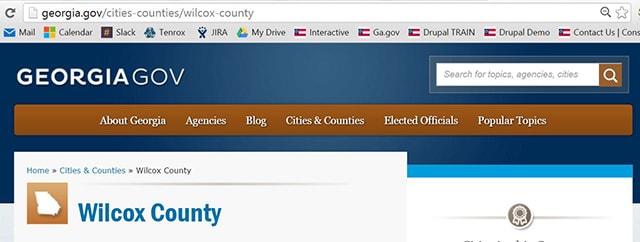
Consider the hierarchy, organization and sequence of your site’s content. On Georgia.gov, the path to Wilcox County is: georgia.gov/cities-counties/wilcox-county. If you read it backwards, you understand (without having to even see the page) that Wilcox is a county in Georgia.
Page titles
Page titles have clout when it comes to SEO. Here is an example of a blog post from the Field Museum about how to identify a meteorite:
Bad: meteorites.fieldmuseum.org/node/34.
Good: meteorites.fieldmuseum.org/identify-a-meteorite.
As mentioned above, search engines pay attention to the title of pages and blog posts. No one is looking for “node 34” in a search. If you have found a piece of rock in a crater that you are convinced must be a meteorite, you are going to search for “how to identify a meteorite.” The second option is more readable by humans (accessible) and has more page weight, meaning it will show up in the search list.
If you are on GovHub, you don't have to worry about erroneously creating a blog post titled “node” because friendly urls are automatic. In your titles, be sure to use keywords and phrases.
Taxonomy
Taxonomy is the practice and science of classification. While originally used for biology, taxonomy is now widely used for information science as well. Yes, if you create or manage content, consider yourself an information scientist.
The big sites like Amazon rely heavily on taxonomy. By correctly tagging, categorizing and cross-referencing content, they are able to place related products or products you’d like in front of you.
You may not be the largest online mall, but you can still take advantage of taxonomy to organize your site, serve related content (topics) and even improve SEO.
Keywords / Key Phrases
Using keywords and phrases is crucial to attract organic traffic to your site. Many times, keywords come naturally when you write about a topic. But all too often, agencies overlook commonly searched terms or other opportunities to relate to the information needs of their readers. A little keyword planning and research goes a long way to ensure that you’re using the best combination of words or phrases.
Keyword Makeover
| Before Keywords | After Keywords |
|---|---|
Welcome To Consumer Ed! Making a major purchase or using credit can be a confusing and overwhelming experience, especially if you're contemplating these decisions for the first time. The Georgia Department of Law's Consumer Protection Unit has designed this website as a comprehensive resource to help you make wise decisions — whether you're buying a car, getting your first house or apartment, applying for credit, or trying to manage your money. Follow ConsumerEd to learn more about these important topics. | Consumer Ed is a service of the Consumer Protection Unit in Georgia. Ask Ed a question about consumer laws in Georgia, and we'll post our answer on the site. We've helped many people by answering questions relating to:
Whether you're applying for home loans, buying a car or you have a question about consumer rights in Georgia, we'd love to hear from you! |
It’s important to keep the audience in mind. Since this agency is in Georgia, specify “Georgia” in the keyword terms. The more specific you are, the more likely people will find you. “Lemon laws in Georgia” has a better chance of being found than “buying a car.”
Predicting the reasons why someone comes to your site for help is a factor in determining keywords. If they are simply “buying a car,” they probably won’t be looking for Consumer Ed. However, if they just found out the used car they bought in Georgia doesn’t work, they will be searching for “consumer rights” or “lemon laws in georgia.” Those are the terms we want to capitalize on.
There are plenty of keyword research tools available online. However, for most state agencies, you don’t need to put too much time or money into keyword research. Having a clear understanding of the industry you operate in, who you help and the topics you cover are what’s most important to finding alternate words or phrases to help people find you.
Also, because you’re a state agency in Georgia, location is important too. When people are searching for help regarding legal or government information, they will likely need to know the specifics pertaining to their state government. The more local and specific you can be, the more likely you’ll be found.
Here is an example of how to blend locality with a specific topic pertaining to your industry. Feel free to use this template for expanding on keywords or keyword phrases that pertain to consumer questions in Georgia.
Keyword Chart
| Generic | Local | Topic-Specific |
|---|---|---|
| Your Car | Buying a car in Georgia | Car financing in Georgia Buying used cars in Georgia Lemon laws in Georgia |
| Your Home | Home buyers in Georgia | Refinancing a house in Georgia Georgia Eviction laws Renters rights in Georgia |
| Your Money | Money management in Georgia | Filing bankruptcy in Georgia Apply for a VA loan in Georgia Small business loans in Georgia |
| Your Security | Your security in Georgia | Identity theft in Georgia Food safety laws in Georgia |
As you can see, adding the location along with a specific topic will give you a better chance of ranking in organic search. You don’t have to go overboard with using the word “Georgia”, but it should be included frequently in blog posts and site page titles.
A large part of our content strategy at Digital Services Georgia involves being accessible. We believe that information, especially government information, should be easily seen and found by anyone including those with various disabilities. Keep in mind that having accessible content benefits everyone: young, old, disabled or not.
As far as your site’s infrastructure on GovHub, we have many accessibility features baked into the framework, such as color contrast, fonts and screen reader functionality. However, making your website accessible doesn’t end with us. We depend on our agencies to keep their websites accessible with accessible content.
Tips For Keeping Content Accessible
- Structure your blog posts for better readability
Making content easy to scan and digest in small chunks helps readers decide if they want to keep reading. Keep blog posts concise and to the point. Break up chunks of text into small paragraphs no more than 4 or 5 sentences. Use headings as summaries to keep the message scannable. This not only helps those with cognitive impairments, but it’s also just good web etiquette. - Use alternative text for images
Alternative text (Alt text) is picked up by screen readers for people who have low vision. Alt text can also be seen when images are disabled to save bandwidth. Relevant images in the body of a page need context. If you have an image that tells a story such as a graph, chart or a photo, it should be accessible. When adding an image on GovHub, you will always have the option to include alt text. Keep it brief and accurate. Imagine describing your image to a friend over the phone or on the radio — what would you say about it? - Name your files clearly
Take any chance you get to properly name your files. If you have a photo of a baby giraffe, your .jpg should read something like “baby-giraffe.jpg” and not “img_00067.jpg.” Not only are screen readers noticing this, but so are search engines (SEO). Any attached documents, images or other files on your site should have descriptive names. - Avoid Countless Links
It’s okay to include links in your pages and blogs, but avoid being a “link list.” It’s annoying and overwhelms. Ironically, the homepage of Americans With Disabilities Act is a good example of what NOT to do on a homepage for those with disabilities.
According to Glenda Hyatt, author of the Blog Accessibility site, link lists are brutal for those using joysticks. “Immediately I am overwhelmed by the number of links on the page that is 10 screens long. I don’t know where to even place my joystick to get started. Or, if my hand is functioning poorly in that moment, navigating the 203 links with my keyboard is energy draining, time consuming and mind numbing,” says Glenda. - Avoid auto-start on video or audio
It’s annoying for everyone. But if you have trouble seeing, or even if the video isn’t visually obvious at first glance, it’s downright frightening to enter a site that suddenly starts playing music. Multimedia is awesome, but please let the user control it.
SEO Checklist
When creating new content, use this checklist to get the most out of SEO.
1. PAGE TITLES
- Are keywords in the beginning of the title?
- Am I using keyword phrases?
- Is my title 50 characters or less?
Title tags are important because the contents of the page title is the clickable headline for listings on Search Engine Result Pages (SERPs) and certain social media shares.
2. SUMMARY DESCRIPTION (META DATA)
- Is my page summary 160 characters or less?
- Does my page summary accurately describe the topic of the page?
- Is my page summary 160 characters or less?
- Does my page summary include keywords?
- Is it enticing enough for people to click on?
On GovHub, we don’t require you to fill in metadata in a separate field. But that doesn’t mean search engines are not picking it up. The very first text on your page should include copy you’d expect to see in a SERP.
3. HEADERS
- Do my headers include related keywords?
- Do my headers help grab the topics of the main post?
- Am I using headers to separate blocks of related content (NOT as a styling tool?)
Headers are used to separate blocks of information for scanability. Formatting your page or blog post with headers help readers but it’s also good for SEO.
4. BODY COPY
- Is my page / post between 400 and 900 words?
- Do I use headers and break my content up in smaller paragraphs?
- Do I include relevant links?
Providing original value is the best SEO strategy. Search engines prefer content that is well organized and has useful information.
5. PAGE LOCATION
- Is my site page easy to find in a menu or submenu?
- Can the user tell where they are and how they got there?
- Is my blog post appropriately tagged by topic?
Page nomenclature is a labeling system. Your pages should fit logically in subpages, etc.
6. IMAGES | MEDIA
- Are my images clearly named using hyphens between words?
- Do my images contain alt text?
- Do I include a caption of the image (including source if needed)?
Choose an image that matches the text on a page. File names should be descriptive and include keywords or phrases. Avoid using numbers or a string of symbols or characters.
How Do You Measure Success?
So, how do you know if your content strategy is paying off? First, don’t expect things to change overnight. It takes months and even years to see results with even the most consistent content strategy. The important thing is to keep it up.
Here are 3 ways to measure the success of your content strategy:
1. Look at data
Through Digital Services Georgia, you have access to tools like Google Analytics and Crazy Egg to measure traffic and behavior. Google Analytics has handy graphs to measure the success of your content over time. It pays to look at these numbers occasionally to see how you are doing.
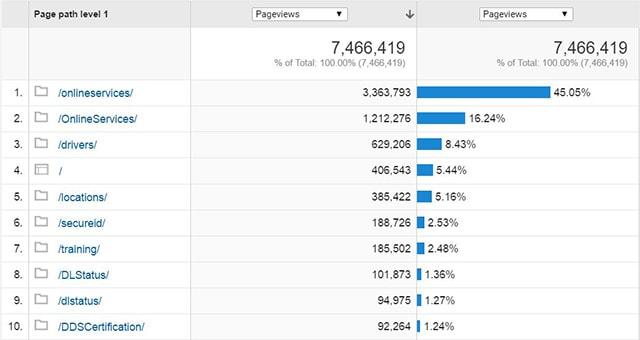
Google Analytics reveals the most visited pages for the Department of Driver Services.
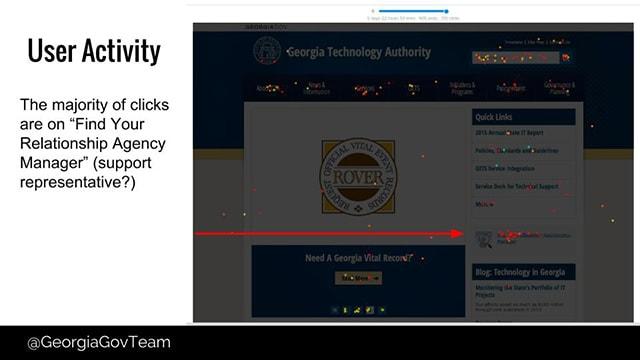
Crazy Egg shows a heat map of user activity.
2. Check for search engine rank
Do a search on a keyword phrase or topic that is highly relevant to your industry — “Lemon laws in Georgia,” for example (Consumer Ed). Where do you, as the authority on a keyword topic, show up in search results? If you have used keywords to your advantage and are a consistent content producer, you should find yourself climbing the ranks of search engines.
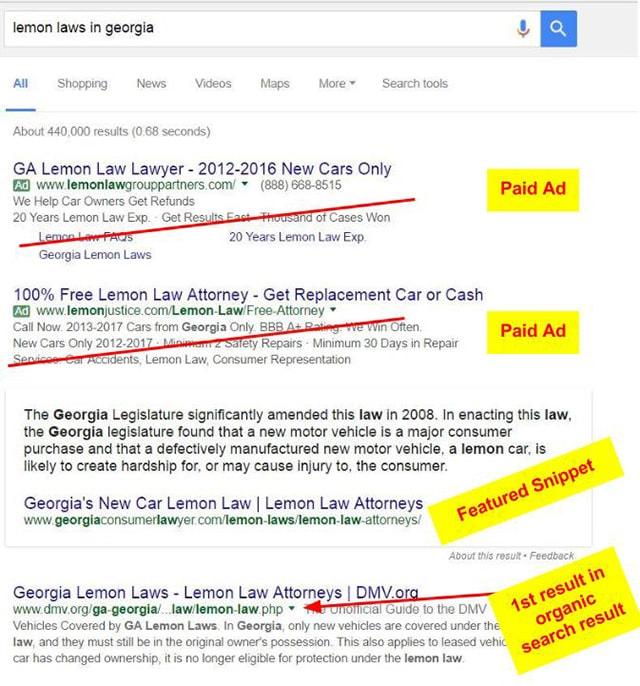
3. Note the interaction
Social shares, user comments, more form submissions and newsletter sign ups are a good sign you are doing something right! If people are interacting with your content, you’ll feel it. Use tools like Google Analytics to track social shares. Record how many people are participating in contests, filling out your forms or going to your events because of something they saw posted on your site.
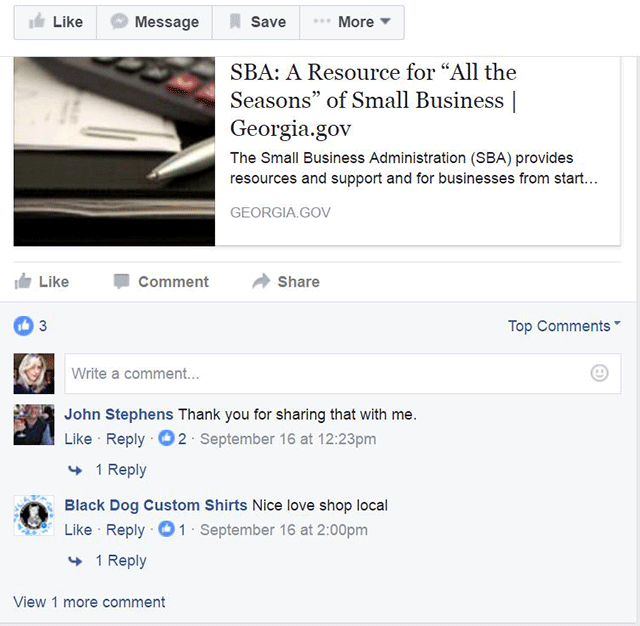
See how your audience is engaging with you. Check comments and interact with people.
Content strategy is something that takes perseverance, consistency and learning. There is always something new to learn in the ever-changing landscape of digital content. The team at Digital Services Georgia is happy to help you if you need tailored consulting with your approach. Meanwhile, make sure to sign up for our newsletter to stay updated on workshops and events!