Digital Standards and Guidelines
Our Digital Standards and Guidelines are for state agency websites in Georgia. These documents are created as a collaborative effort between Digital Services Georgia and state agencies who participate in the Digital Center of Excellence.
The Digital Standards are required practice for all state agencies. We also provide Guidelines as recommendations to ensure that people have the best experience searching for information on your site.
State Agency Digital Standards (Required)
As Georgia constituents are turning to the web and their mobile devices for information, state agencies are required to adhere to a standard for which information is best presented. Please refer to these digital standards to ensure your content is fully accessible and optimized to meet the requirements established by our internal advisory committee.
State Agency Digital Guidelines (Recommended)
Our Digital Guidelines are recommended for state agency websites according to industry-standard best practices for technical, content, social media, and usability.
0.1 Background
0.1.1 Georgia.gov
- Georgia.gov gives Georgians online access to information from agencies across state government, all from a single electronic door.
- Georgia.gov provides convenient 24/7 access to Georgia government services and information.
- Managed by the Georgia Technology Authority (GTA) since July 2002, georgia.gov links to thousands of pages of information and hundreds of State interactive services.
- Although most links go to state Web sites that were already in existence, GTA encourages each agency to develop a direct presence on the portal.
- The primary goal of georgia.gov is to provide best-of-class customer service by allowing convenient, anytime access to government information and services.
Georgia.gov Core Values
- Official (Authentic)
- Friendly
- Easy
- Emphasis on Customers/Constituents (You)
- Trusted
- Accurate
- Informative
0.1.2 State Agencies and Elected Officials
The goal of State agency and elected official websites is to give constituents information and services related to their agency. The information and services on these sites are specific to each agency’s mission and purpose, and each will be different. But all sites should try to accomplish three other goals:
- Assure citizens that they are on an official government website;
- Give them a common user experience;
- Stand behind Georgia.gov’s core values (see above).
This document will help you and your agency achieve these goals by ensuring that your site follows best practices and vetted standards that are common among the best websites.
1.0 Technical Standards
Technical standards are meant to include ways that web technologies are used to display and relate information. This includes how to make the content accessible and usable, and best practices for code and markup to utilize the abilities of modern browsing devices while still accommodating older web browsers. It also includes methods of aggregating content, gathering analytics, and policies on privacy and security.
Technical standards and guidelines are set by the georgia.gov Interactive Team, with cooperation and participation from the Georgia Web Strategy Working Group. Level 1 Standards are enforceable by the georgia.gov Interactive Team and the Governor's Office.
1.1 Georgia.Gov Domain Name Standards
POC for Changes: Georgia.gov Interactive
Synopsis: Domain naming convention and Federal Dot-Gov Final Rule.
1.1.1 PURPOSE
The purpose of the GTA Portal Domain Naming Standard is to create a consistent, predictable way to assign domain names for state agency websites and email addresses. Having a managed domain name such as georgia.gov unifies all state entities under one naming convention, establishes consistency and assures citizens that they are accessing an official government site.
1.1.2 SCOPE
All State of Georgia governmental entities and programs, including those governmental entities and programs of political subdivisions of the State of Georgia that request a georgia.gov or ga.gov domain name space for web or email usage.
Domain names ending in state.ga.us will no longer be issued, but the maintenance of existing names will be governed by the rules and conventions set forth in Federal RFC 1480.
1.1.3 STANDARD
Ownership: As the trustee and provider of the State of Georgia’s web presence, the Georgia Technology Authority will manage and authorize the assignment of third-level domain names under the georgia.gov and ga.gov second-level domains. Entities assigned a third-level domain name will manage the use of paths located within their sub-domains.
Eligibility: Eligibility for these domain names is limited to qualified State of Georgia (including its political subdivisions) government organizations and programs.
IP Address: All third-level domain names must point to a uniquely named server that has a direct address and a unique IP address.
Secure Socket Layer Certificates
Organizations are responsible for purchasing and managing Secure Socket Layer Certificates. GTA will authorize use of the georgia.gov and ga.gov domains for certificate providers.
Domain Name Registration Process
Requests for domains should be directed to Georgia.gov Interactive at [email protected]. Entities wishing to reserve a name for future or internal use (as opposed to an immediate need) may register as well.
The requestor must include the proposed domain name and the purpose of the website in which the domain name will be used. If approved by Georgia.gov Interactive, the request will be submitted to AT&T via OrderNow for creation.
* Note: The person applying for the domain name should be authorized to speak for the entire organization in this matter. The person must obtain the agreement of all interested parties within the organization prior to submission. GTA may require confirmation of a registration request from the Agency Head or highest ranking IT official.
Email Address Use
Eligible entities may request ga.gov email addresses (ex. @yourorg.ga.gov) through the same process and may use them prior to the establishment of a georgia.gov website. The email address should use the same naming convention as the organization’s third-level domain name character string (e.g. [email protected]).
Domain Name Selection
The requesting entity must ensure that it has the right to use the name it is requesting. GTA will check its DNS records and databases, and GTA will not issue a georgia.gov domain name to the organization that is in conflict with an officially recognized title (including the acronym) of another georgia.gov state government organization without further clarification.
The following additional general rules apply:
- Obscene names are not permitted.
- Permissible characters are lowercase letters and digits. No hyphens will be used.
- The word “georgia” cannot be in the third level domain name, since georgia is already in the second level domain.
- The agency acronym should suffice for most agency websites, as determined by the Office of Planning and Budget.
- Websites for statewide programs and initiatives may use either acronyms or a word that describes what the program is for or what it benefits - e.g., children.georgia.gov.
Domain Name Disputes
Georgia.gov Interactive will decide on all matters related to registration and subsequent use of an assigned georgia.gov domain name.
Disputed decisions can be appealed to the State CIO and Executive Director (or his/her designee). The GTA Executive Director is the final authority on all matters relating to registration and subsequent use of georgia.gov domain names.
Exemptions
Any state entity requesting a domain name that does not meet the general rules outlined in Section 3.7, Domain Name Selection, must submit an exemption request outlining the reason behind the exemption. GTA will work with entities requesting domain name exemptions from the guidelines to understand if the reasons for the exemption outweigh the benefits of consistency and predictability gained from adherence to the guidelines.
Second Level .gov Domains
As a rule, second level domains (xxx.gov) are not allowed. Any exceptions must be submitted to GTA’s Chief Technology Officer along with justification for the exception. Any new .gov domain requests must be approved by the state CIO.
Fourth-Level Domains (Ex: four.three.two.gov)
Fourth-level domain names are difficult to remember and are discouraged from use. The preferred option is to use a directory name that appears after the domain name - e.g., agency.georgia.gov/division.
1.2 Digital Accessibility Standards
PSG Number: SM-19-001
Topical Area: Web Design and Development
Issue Date: 8/28/2019
Effective Date: 8/28/2019
Document Type: Standard; Published (approved by Web Standards Group and GTA)
POC for Changes: Digital Services Georgia
Synopsis: Accessibility standards and guidelines for State of Georgia websites and applications.
Purpose
All individuals, regardless of ability, should be provided with equal access to web content in compliance with the WCAG 2.1 guidelines and standards specified below, which include, but are not limited to, websites, web-based applications, documents that exist online, and other digital properties.
Standard
WCAG 2.1 AA Compliance
All digital properties managed by state entities shall be accessible according to WCAG 2.1 (Level AA) Compliance standards. Accessibility is the practice of designing digital properties to provide users with equal access to site content, regardless of ability. While accessibility is often associated with providing assistance to individuals with disabilities, it is also of benefit to the general population in a variety of ways, some of which include an improvement in performance when having to rely on slower Internet connections such as mobile networks, individuals who have sustained a temporary injury such as a broken or sprained hand or arm, or situations in which individuals’ cognitive abilities are compromised due to a crisis or temporary health factors.
WCAG 2.1 AA requires that all websites, web applications, and other digital properties be perceivable, operable, understandable, and robust. In other words, users must be able to access, understand, and contribute to your content without having to rely solely on one single sense (hearing, seeing, touch, etc). Assistive technologies (e.g., screen readers) must be able to interpret meaning and purpose from the code provided. Some techniques to make your digital properties accessible include:
- Offering alternatives for content, such as images, video, and audio
- Choosing font sizes, text spacing, colors, and ease of zooming in on mobile making the experience more suitable for users with low vision or color-blindness
- Semantic markup and content structure that includes landmarks, useful labels, and roles to announce status changes making the experience more suitable for screenreader users
- Ensuring all content can be tabbed through with a keyboard, using sequential section headings and semantic markup
- Style your website so that it does not require a single display mode
- Provide simple alternatives (e.g. single tap vs. swipe) to potentially complex finger motions and interactions on touch screens
- Make it so the visibility of additional content (e.g. pop-ups, submenus) can be controlled by the user at all times
- Autocomplete for form inputs
Accessibility Statement and Site Contact
Each website shall feature an accessibility statement that describes the organization’s policy, efforts, and initiatives to meet accessibility needs. All accessibility statements must, at minimum, identify WCAG 2.1 (Level AA) compliance, per standard. If you do not wish to create your own accessibility statement, you may link to Georgia.gov’s Accessibility Policy.
Contact information must be provided for users seeking help, or those who are adversely impacted by an accessibility barrier.
Regular Accessibility Audits
Agencies must perform either an internal or external accessibility audit on all digital properties at least once every 36 months. Audits must be performed against WCAG 2.1 AA standards, and errors identified should be remediated within nine months of the audit. Audits should not rely on automated testing tools alone, but should also include manual testing and review.
The first audit is required to be a detailed, manual audit conducted by an external vendor. All subsequent audits can either be performed by an external vendor or by a trained accessibility staff member and can be done using online tools or services. Contact Digital Services Georgia for more information.
More frequent auditing is also encouraged and can be achieved using browser extensions that perform automated testing on your website's content as it changes.
GTA reserves the right to audit an agency to validate that an accessibility test has been performed and successfully remediated within the 36-month period.
Accessibility Procurement
All solicitations and contracts for work involving digital properties within the scope of this standard must establish accessibility requirements to ensure that vendors are in compliance. Mandatory requirements include that all content, interfaces, and navigational elements must be WCAG 2.1 AA compliant and that all work produced should be regularly tested for accessibility concerns and remediated within the standard timeframe. (See suggested language for procurement solicitations and contracts as provided by the Digital Services Georgia team).
Resources
- NonVisual Desktop Access (NVDA) - Screen Reader for Windows only
- WAVE Accessibility Extension - Firefox extension Screen Reader
- Color Contrast Analyzer
References
2.0 Technical Guidelines
Technical guidelines are meant to include ways that web technologies are used to display and relate information. This includes best practices for code and markup to utilize the abilities of modern browsing devices while still accommodating older web browsers. It also includes methods of aggregating content, gathering analytics, and policies on privacy and security.
Technical guidelines are set by the georgia.gov Interactive Team, with cooperation and participation from the Georgia Web Strategy Working Group. Guidelines are not enforced, but are rather used as recommendations for best practices.
2.1 Code and Markup Guidelines
PSG Number: GM-14-005
Topical Area: Web Design and Development
Issue Date: 11/1/2013
Effective Date: 11/1/2013
Document Type: Guideline; Published (approved by Web Standards Group and GTA)
POC for Changes: Georgia.gov Interactive
Synopsis: Code and Markup guidelines for State of Georgia web sites.
2.1.1 Develop with Web Standards
It is important to develop with standards compliant code to ensure that it is compatible with the most web browsers and devices over a longer period of time.
The World Wide Web Consortium (W3C) provides technical documentation on standards, as well as free tools to assist you in developing standards compliant websites.
2.1.2 HTML / CSS
New websites should be built with HTML5 / CSS3 standards that are supported in modern web browsers, while using graceful degradation techniques to ensure that the sites still display sufficiently on older web browsers.
* Use analytics data to determine the older web browsers your site needs to support. If a web browser version is used by more than 3% of visitors, be sure all major content is still accessible using graceful degradation.
For more details on HTML and CSS, see the W3C Standards for HTML and CSS.
2.1.3 Javascript
Javascript may be used to enhance website content and design. DO NOT display main content with Javascript, as it may prevent search engines from ranking the content.
For more details on scripting, see the W3C Standards for Scripting and Ajax.
2.1.4 Frames
Do not use frames to display content.
Frames pose problems with usability, accessibility of the site to the visually impaired, and make it difficult for search engines to index the website. If an iframe is required for functionality, it should be titled with text that facilitates frame identification and navigation.
2.1.5 Definitions
graceful degradation - coding the site in a way that utilizes modern coding standards while allowing for old browsers to still render the page effectively. For example, you can provide CSS for multiple background images for browsers that support it, while also providing a single background image for older browsers that do not.
2.1.6 Resources
2.2 Multimedia Guidelines
PSG Number: GM-14-005
Topical Area: Web Design and Development
Issue Date: 11/1/2013
Effective Date: 11/1/2013
Document Type: Guideline; Published (approved by Web Standards Group and GTA)
POC for Changes: Georgia.gov Interactive
Synopsis: Multimedia guidelines for State of Georgia web sites.
2.2.1 Audio, Video, and Animation
Use video, animation, and audio only when they help to convey, or are supportive of, the site’s message or other content.
- DO NOT set audio or video to auto-start on page load or on mouse-over.
- DO provide manual controls to start, pause, and navigate through the multimedia element.
- DO support keyboard interaction so that users who cannot use a mouse can still control the function of the multimedia.
Please reference the Accessibility Standards on Alternates and Fallbacks for requirements on providing text equivalents to video and audio.
2.2.2 Flash
If at all possible, do not use Flash at all. Most things that used to require Flash to display can now be accomplished using CSS3, Javascript, or JQuery.
If you find it is necessary to keep a flash component on the page, it should be as a supplemental element. Be sure that any relevant content is also available in a text format.
As a best case scenario, use Javascript to check if a user’s computer supports Flash. If it does not support your Flash content, use Javascript to replace the Flash content with a text or image equivalent.
2.2.3 Video Hosting
We recommend using a 3rd party video hosting server environment that is tuned to hosting videos, and embed them on your website.
Hosting videos on your own servers is discouraged for a number of reasons, including the large file sizes and bandwidth requirements of video streaming / downloading. By hosting your own videos you will also need to create a number of file format types in order to make your video accessible to different operating systems and web browsers. Video hosting services are better tuned to the video storage and streaming, and are also set up to auto-convert video to a number of formats.
Recommended video hosting services include but are not limited to:
- YouTube
- Vimeo
- Brightcove (paid service)
* Note: When setting up an account for a third party video hosting service, be sure to use a generic, agency-specific email account that can be taken over by another user should you be out for any reason, or should someone else take over your role managing the content. Also be sure that your supervisor also has the login information to maintain business continuity.
2.2.4 Resources
2.3 Web Forms Guidelines
PSG Number: GM-14-005
Topical Area: Web Design and Development
Issue Date: 11/1/2013
Effective Date: 11/1/2013
Document Type: Guideline; Published (approved by Web Standards Group and GTA)
POC for Changes: Georgia.gov Interactive
Synopsis: Web Forms guidelines for State of Georgia web sites.
It is important to make online forms as user friendly as possible to ensure that visitors are able to complete the form process without complications. The more complicated or difficult a web form is, the higher the likelihood that a visitor will not complete the process. This can result in lost revenue, or an increase in phone calls and walk-ins to complete transactions that visitors would otherwise like to complete online.
The following is a guide to make your forms as usable and easy to complete as possible.
2.3.1 Linear Path
- DO keep form interaction linear, with no diversions or loops.
- DO lay out fields vertically (e.g., the “Last Name” field should appear below “First Name” instead of to the right of it).
- DO ensure that users can navigate forward and backwards in a multi-page form without losing their data.
- DO include a progress indicator for multi-page forms (e.g. “Step 1 of 3”).
- DO end the form with a clear Confirmation page that helps users know what to do next.
2.3.2 Readability
- DO keep text labels left-aligned to the left of the form input fields.
Text labels should not appear above the input field if possible, as that breaks up the flow of readability. Similarly, having form fields right-aligned to the left of the form fields creates a jagged left edge that breaks up the readability flow (examples in the article on Creating Usable Online Forms from Usability.gov). - DO use simple terms in labels; avoid using jargon that not all users will be familiar with.
2.3.3 Accessibility
- DO use HTML labels for form elements.
- DO use tabindex attribute controls to enable ease of keyboard-only navigation.
- DO use symbols to indicate required fields and error messages; do not simply rely on color for these indicators. (For example, use an asterisk to denote required fields, or the term “optional” to denote optional fields).
2.3.4 Usability
- DO perform functionality and usability testing on completed forms and applications to ensure that they behave as expected.
- DO describe the content type and other form attributes in your fields. e.g.:
type=email
autocapitalize=off
autocomplete=off - DO hide optional fields when possible - only include essential form fields.
- DO provide clear error messages and error indicators for fields that need correction.
- DO ensure that all other form fields remain filled in when an error message appears.
2.3.5 Resources
- Usability.gov: Creating Usable Online Forms
- Usability.gov: Online Form Development, Lessons Learned
- Web Style Guide, Designing Applications
2.4 RSS Feed Guidelines
PSG Number: GM-14-005
Topical Area: Web Design and Development
Issue Date: 11/1/2013
Effective Date: 11/1/2013
Document Type: Guideline; Published (approved by Web Standards Group and GTA)
POC for Changes: Georgia.gov Interactive
Synopsis: RSS Feed guidelines for State of Georgia web sites.
RSS stands for Really Simple Syndication. It is a web page format that allows visitors to subscribe to a section of your website using an RSS aggregator in order to be notified when new content is posted. Other websites can also syndicate and display your content as supplemental information, thereby giving your new content a wider audience.
2.4.1 When to Use RSS
RSS is ideal for content that is regularly updated, such as news, press releases, blogs, podcasts, and event information.
Georgia.gov syndicates Agency RSS feeds on its main topic pages for News and Press Releases. To have your Agency Press Releases posted on the Georgia.gov website, be sure your feed matches the appropriate RSS formatting below, and then open a Portal Support Ticket indicating that you would like your RSS feed to be added to the Georgia.gov website, and include the URL of your feed.
* Note for Portal agencies: RSS feeds are generated automatically for Press, Blogs, and Events in the Drupal CMS. Relevant RSS feeds on portal websites will be automatically added to the Georgia.gov website, so no support ticket will be necessary.
2.4.2 RSS Markup Formats
RSS is written in the XML markup language, and can take different forms depending on the content being syndicated. The most efficient way to keep an RSS feed updated is to have your Content Management System (CMS) set up to automatically update the RSS file when new content is published.
Follow the RSS 2.0 guidelines for formatting your RSS feed.
At minimum, your RSS feed should contain the following information:
<?xml version="1.0" encoding="iso-8859-1"?> <rss version="2.0"> <channel> <title>Title for your RSS feed</title> <description>Description of the RSS feed</description> <link>Your homepage URL</link> <language>en-us</language> <pubDate>Fri, 31 Dec 2011 21:00:00 EST</pubDate> <item> <title>Item title</title> <link>Full URL of item on website</link> <description>Short Description of item</description> <pubDate>Fri, 31 Dec 2011 21:00:00 EST</pubDate> </item> <item> <title>Item 2 title</title> <link>Full URL of item on website</link> <description>Short Description of item 2</description> <pubDate>Fri, 31 Dec 2011 20:00:00 EST</pubDate> </item> </channel> </rss>
* Note: <pubDate> shows when the channel or item was published. The date should be expressed in the following format: day_of_week, day_of_month three_letter_month_abbreviation year hour:minute:seconds timezone. Example: Fri, 31 Dec 2011 20:00:00 EST
2.4.3 Indicating RSS Feeds
When linking to an RSS feed, it is a common practice to use the RSS feed icon:
2.4.4 Glossary
RSS Aggregator: Also known as an RSS Reader. A program that allows users to subscribe to RSS feeds, which checks for new content and displays it within its interface. An example is Feedly (https://feedly.com/).
2.4.5 Resources
2.5 Analytics Guidelines
PSG Number: GM-14-005
Topical Area: Web Design and Development
Issue Date: 11/1/2013
Effective Date: 11/1/2013
Document Type: Guideline; Published (approved by Web Standards Group and GTA)
POC for Changes: Georgia.gov Interactive
Synopsis: Analytics guidelines for State of Georgia web sites.
2.5.1 Web Analytics Overview
Website analytics are a series of metrics that help indicate the popularity and success of your web site, as well as a series of user statistics that provide an overall picture of the devices, operating systems, and software your audience uses to experience your site.
Evaluating web analytics is the process of collecting, analyzing, and evaluating data that tell you how well your website is meeting its objectives, so you can make improvements. Analytics evaluation is not a one-time process; it requires an overall strategy of routine evaluation to determine how your audience changes over time, and how successful your site is as it changes or remains static over time.
2.5.2 Develop a Plan
You should develop an analytics plan and review and adjust it regularly. Ask yourself and key stakeholders these questions:
- What do you need to measure? What are your requirements?
- How will you measure it?
- What tools will you use?
- What methodologies are needed to gather the data you need?
- What will you do with the results?
- How will the results help meet the goals for your website and your agency’s mission?
- How does the plan fit with your agency’s overall strategic and performance plan? How does it aid in the goals of individual program offices?
2.5.3 Analytics Tools
There are a number of metrics to measure, and ways to gauge website effectiveness. Some useful tools for analyzing your website include:
Web Analytics tools such as Google Analytics, Siteimprove or Omniture will give a variety of metrics on your users, their hardware and software usage, time spent on pages, which pages they’ve visited, and what search terms they use to access your website.
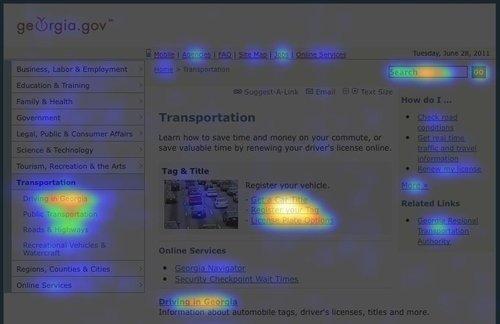
Eye Tracking tools such as Crazy Egg give you a graphic picture of where users are clicking on your page. This goes beyond standard analytics metrics to show you exactly what terms and graphics on the page are catching users’ eyes, and which parts of the page are being completely overlooked.
Customer Satisfaction Survey tools such as SurveyMonkey can be set to load a short survey as a user is leaving the website. You can use these to ask users 3 of 4 questions about their visit, if they found what they were looking for, and what it was they were looking for on your website. Surveys can be posted to schedule a survey to load after a certain number of minutes on a site.
Usability Testing can be accomplished on a low budget with simple tools such as FiveSecondTest to gather first impression usability feedback from testers to evaluate the effectiveness of a page layout or campaign.
2.5.4 Evaluating Website Effectiveness
Audience Analysis - Use a web analytics tool to gather a clear picture of your audience and its needs. Some things to measure and plan for include:
- Web Browsers - be sure your website supports the web browsers used by at least 95% of your users. Government websites should not prevent a user from accessing its information because they use an outdated web browser.
- Screen Resolution - understand the monitor sizes of your visitors to determine your strategy for web layout and dimensions
- Mobile - see what percentage of your traffic comes from mobile devices, and what content mobile users are looking for.
Audience Goals - You can also use analytics to determine what your users are looking for on your website, and to some extent, whether or not they were able to reach those goals. Some information to analyze includes:
- Most frequently viewed pages - helps to determine what people are looking at
- Terms visitors type into commercial search engines to find your site - helps to determine where you are succeeding in your Search Engine Optimization techniques (are people finding your site using the terms you would expect them to use?)
- Terms visitors type into your search box to find information on your site - helps to determine what information your users are not finding on their own, and often which topics are most important to your visitors.
- Top entry websites - who is referring visitors to you? (Where did your visitors come in from?)
- Bounce Rate - the percentage of single-page visits or visits in which the person left your site from the entrance (landing) page.
2.5.5 Utilizing the Data
Once you’ve gathered and evaluated your analytics data, you can use this to develop a clear plan for how to improve on your website. Some questions you may ask when analyzing this data include:
- Which web browsers should my website be tuned for? (Which browsers make up the top 95% of users?)
- What are the keywords I should keep in mind when writing content and setting up meta keywords? (see the SEO section for more on keyword strategies)
- Do I need a strategy for making my content more accessible to mobile users?
- What are visitors looking for? Do I need to update my content to better address these items?
- Do I need to make certain information more prominent to help visitors find it?
- Do I need to write new content to address topics my users are searching for? (For example, some state agencies have found that constituents go to their website searching for topics that are handled by federal or local agencies, so they will write content to address those topics and redirect constituents to the appropriate agencies.)
- Is my homepage geared toward the things my visitors want the most?
- Is the website meeting our Agency’s stated goals?
References
Resources
2.6 Mobile Guidelines
PSG Number: GM-14-005
Topical Area: Web Design and Development
Issue Date: 11/1/2013
Effective Date: 11/1/2013
Document Type: Guideline; Published (approved by Web Standards Group and GTA)
POC for Changes: Georgia.gov Interactive
Synopsis: Mobile guidelines for State of Georgia web sites.
Recent statistics show that mobile Internet growth is doubling every year. Global use of mobile devices accessing the Internet for January 2012 was 8.5% of total online usage (source). From these trends, estimates show that by 2015, more U.S. Internet users will go online through mobile devices than through PCs or other devices. This makes it increasingly important to make sure your website is mobile accessible.
Mobile Usage Statistics
As a point of reference, the following is a breakdown of the mobile devices used to access georgia.gov in January 2012. This is for reference only, and statistics will change over time. Whenever possible, use your own current analytics information to help determine your target audience.
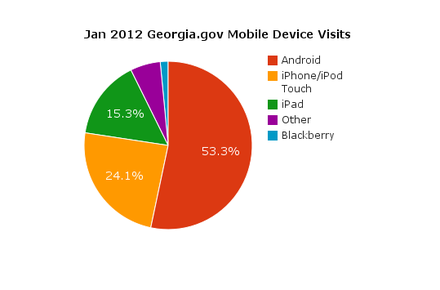
| Device | Percent |
|---|---|
| Android | 53.32% |
| iPhone/iPod Touch | 24.07% |
| iPad | 15.29% |
| Other* | 5.80% |
| Blackberry | 1.52% |
*Other includes Windows 7 devices, non-Android/iPad tablets, and any other mobile device that does not fall under the most common mobile devices.
2.6.1 Mobile Applications (Apps)
When talking about mobile accessible web content, it is common to consider developing mobile applications (apps) for the devices. When considering mobile app development, keep in mind the following factors:
- Each mobile phone platform requires you to develop a separate app. (For example, you may need an iPhone app, an Android app, and a Blackberry app depending on user statistics).
- Not all mobile phones with web access also support separate downloadable apps.
With these points in mind, it is important to weigh the factors before deciding whether to develop a mobile app, or to provide all the necessary information from a mobile-compatible website.
DO NOT develop an app:
- When the app will just repeat content and features available from your website
(For example, an app that just has screens of text, bullet lists, or images). - When you have a low budget
- When only a small subset of users will need the functionality
- When the user will only need to use the app once a year or less.
(For example, drivers’ license renewal should be available as a form that functions well on the mobile website, not built as a separate app that users only need once every few years).
DO develop an app:
- When the functionality required will utilize the mobile device’s hardware (for example, if it relies on GPS, photo capability, phone functionality, etc.).
- When the available mobile browser software limits your abilities to perform necessary functions.
- When the user needs to be able to access the information offline (without a data or Wi-Fi connection).
- When you have the necessary budget to develop the app functionality on all major smartphone platforms, as well as the budget to advertise the app to make people aware of its availability.
See 2.6.5 Case Studies below for examples of good mobile app usage and good use of mobile websites.
2.6.2 Mobile Websites
In many cases, you can make all your information and services available to mobile users by tuning your website to be mobile accessible.
DO NOT remove web content from the mobile version.
Ensure that users can perform all the same functions on the mobile site that they can perform on the website, including access to all information and access to creating and managing user accounts on applications.
If there is any content that you think should not be available on the mobile version, ask yourself it it needs to be on the website at all. This extraneous information may need to be removed from the website altogether if you’ve identified it as information that users with a mobile device would not find useful. Similarly, a mobile user should not be expected to switch to a computer’s web browser in order to access some of your site’s content.
Consider a Responsive Design or Adaptive Design technique when developing your website.
Rather than designing, developing, and maintaining a separate Mobile version of the website, consider using a Responsive or Adaptive design technique for your main website. In each design strategy, the same website is tuned using CSS and Javascript to display content in a different layout based on the screen resolution of the device. The same website will have a different layout on a 320px wide device than it will on a tablet that is 800px wide, and again will have a different layout on a desktop with a 1200px screen width (with different device “breakpoints” depending on your layout needs).
All the important content should still be available, but using analytics you can determine which elements are more commonly needed by mobile users. Those elements should be positioned at the top of the screen, while less commonly used items would be further down.
* Note: The Georgia.Gov website is built using responsive design geared towards providing a beautiful and easy-to-use experience customized to mobile, tablet, and desktop device breakpoints. Portal agency templates are not responsive, however they have been built using web-kit mobile-friendly techniques and technologies that performs well on iOS and Android smartphone platforms, allowing the smartphone browsers to fully render those websites utilizing the smartphone’s built-in scaling technologies. The development also avoids Flash and other processor-intensive client-side technologies to allow these sites to perform well across a wide suite of mobile devices.
Graphic Considerations
When developing a website that will be available for mobile and desktop users, consider mobile bandwidth restrictions and be sure to tune your images, fonts, and other bandwidth-intensive elements to be able to load quickly on a mobile device. Whenever possible, a smaller version of each should be available for mobile and tablet devices than what will be downloaded for a desktop or large screen device. At times, you may decide that certain decorative graphic elements don’t need to download and appear at all on the mobile version.
You may want to consider using server-side feature detection scripts to determine the image sizes, fonts, videos, etc., to serve to the site depending on the visitor’s device. When used in conjunction with a Responsive Design solution, this is referred to as RESS (Responsive Design + Server Side Components).
Mobile First
When planning a website redesign, it can be helpful to plan using a Mobile First mindset. In this strategy, you begin by designing and developing the content, layout, and functionality based on what would be necessary for a mobile user. From there you can adjust the design and layout for desktop and large screen devices.
2.6.3 Usability for Mobile Devices
Keep in mind that mobile users will likely be using their fingers to navigate their screen. Design mobile apps and websites with large touch targets and, when reasonable, gestures and finger swipes as well.
When selecting colors and contrast, keep in mind that some portable devices are black and white, and also consider that users may be outdoors with a glare from the sun. Your designs should maintain a high degree of contrast for these considerations.
Minimize the need for typing interactions. For form fields, be sure to apply the appropriate content type attributes (e.g. <input type=”email”>) to enable input type-specific keyboard displays. (For example, on an iPhone or iPad, the keyboard displays an @ symbol in the common keys area when type=”email” and it switches to display a number pad when type=”tel”).
2.6.4 Testing Websites for Mobile
When designing and developing for the mobile web, the idea of testing functionality on multiple mobile devices can get overwhelming. While it is necessary to test your design and development on mobile devices to ensure that your website translates appropriately to mobile, it’s not feasible to acquire and test on every type of mobile device available to users. We recommend taking a balanced approach.
Code Validation
A good first step to testing your website for compatibility is to actually check it’s mobile-friendliness using a validator such as the W3C mobileOK Checker or MobiReady. Once you’ve resolved any issues that arise in the validators, you are ready to move on to testing on devices and emulators.
Testing on Real Devices
The vast majority of mobile web users are currently on an iOS or Android device. This means it’s most important to “get it right” on those devices, so testing for them should be done on the devices themselves. There will be behavioral nuances that can only be caught on the devices themselves. If at all possible, you will want to test on the following mobile and tablet devices:
- iPhone (newest iOS version)
- also test using Opera Mini
- iPod touch (one iOS version behind current)
- iPad
- Android phones (various manufacturers and versions where possible).
Test on the stock browser, as well as the following browsers: - Android tablet
- Kindle Fire - this eReader now has a web browser built in as well
Testing Using Emulators
To test how Responsive and Adaptive breakpoints translate to different device sizes, as well as general mobile behavior testing, Mobile Emulators are a good backup testing resource. They still won’t compare with the real devices, and may have their own glitches. However, testing using emulators is preferable to skipping mobile testing altogether. Use your analytics data to determine which devices are the most popular, and test for those. A comprehensive list of mobile emulators is available at MobileExWeb.
2.6.5 Case Studies
Ready GA iPhone App
GEMA’s iPhone app provides localized Emergency alerts, maps for shelters in case of an emergency, and a number of emergency tips. Its use of geolocation for alerts and shelter location, as well as its offline availability for tips and checklists makes this a prime candidate for a mobile App.
CA.gov Locator iPhone App
This mobile iPhone app for California residents uses the device’s GPS functionality to help constituents locate government services near them, such as libraries, parks, and DMV offices.
Utah’s State Parks Field Guide iPhone App
Utah’s State Parks iPhone app uses the phone’s geo-location services to enable users to find parks nearby, and also provides static maps that users can access when they don’t have phone or Wi-Fi service. These two features make it a prime candidate for a mobile app instead of just referring users to a mobile website.
Fishing Spot Mobile Website
Rather than develop a device-specific app to browse for fishing spots, California’s Department of Fish and Game developed a mobile website that uses large touch-click areas and a mobile style interface to display all the relevant information within a mobile device’s web browser.
Smithsonian Institution’s Collection Search Mobile Website
Again, rather than develop a specific app for existing website functionality, the Smithsonian developed a mobile-friendly web interface for users to search or browse images of their entire collection online.
2.6.6 References
- W3C Device APIs working Group
- Mobile First Presentation
- Bridging the App Gap
- Mobile App Usage statistics
- Mobile Only statistics
- Multi-Device Web Design
- RESS: Responsive Design + Server Side Components
- Test on Real Mobile Devices without Breaking the Bank
2.6.7 Resources
2.6.8 Revision History
11/29/2012 - Removed 2 broken links from "References" section. Updated Testing to list nonspecific iOS versions.
06/02/2015 - Removed broken links from "References" section.
2.7 Privacy and Security Statement
PSG Number: GM-14-005
Topical Area: Web Design and Development
Issue Date: 11/1/2013
Effective Date: 11/1/2013
Document Type: Guideline; Published (approved by Web Standards Group and GTA)
POC for Changes: Georgia.gov Interactive
Synopsis: Privacy and Security guidelines for State of Georgia web sites.
Georgia.gov websites are designed to make it easier and more efficient for Georgia citizens and businesses to interact with their State Government. Georgia government strives to provide online resources in a safe, secure manner that respects your privacy when you visit our sites. This privacy statement addresses the collection, use, disclosure, and security of information that may be obtained by the State of Georgia when you visit Georgia.gov websites.
2.7.1 Information Collected
If you visit a Georgia.gov website, the State may collect some or all of the following information:
- The name of your domain; for example, "xyzcompany.com" if you use a private Internet access account;
- An IP address; a number automatically assigned to your computer when you are using the Internet;
- The type of browser and operating system used to access our site;
- The Internet address of the website from which you linked directly to our site;
- The pages you visit within the portal; and
- The links made to other websites through this site.
This information is collected for statistical analysis using third-party or proprietary software programs to create summary statistics. The statistics are used for the purpose of determining what information is of most and least interest to all visitors and identifying system performance or problem areas in order to better plan future portal enhancements. This information is not collected for commercial marketing purposes.
If, during your visit to a Georgia.gov website, you voluntarily provide personally identifiable information, we will collect such information. Examples of personally identifiable information may include:
- Your name, address, or phone number;
- An e-mail address if you are communicating to us through e-mail;
- Information you voluntarily submit to the State of Georgia for the purposes of completing or submitting an application or form online;
- Other information volunteered, such as vendor profile/contact information, survey information or content of e-mail.
In general, please note the information collected, whether or not personally identifiable, is not limited to text characters and may include audio, video and other graphic formats you send us. Information is retained and used in accordance with existing laws, rules, regulations, and other policies.
2.7.2 Use
Depending on the specific service or transaction, the State of Georgia may share personally identifiable information amongst its agencies in order to provide such service or complete such transaction.
Public Disclosure
As a general rule, we will not disclose any personally identifiable information collected online to entities outside of State of Georgia departments and agencies except where you have given us permission, or where the information is public information under the Georgia Open Records Act O.C.G.A. 50-18-70 et seq., or other applicable laws. Visitors should be aware that information collected through a Georgia.gov website may be subject to examination and inspection, if such information is a public record or not otherwise protected from disclosure.
Cookies
Georgia.gov websites may occasionally use "cookies" to customize your browsing experience. Cookies are simple text files stored by your web browser and they provide a method of distinguishing among visitors to the websites, and allowing customized features such as a "shopping cart" feature for online purchasing. Cookies created on your computer by using our websites do not contain personally identifiable information and do not compromise your privacy or security. You can refuse the cookie or delete the cookie file from your computer at any time by using any one of a number of widely available methods.
2.7.3 Security
Several tools, policies and protocols are used to safeguard the submission of information through Georgia.gov websites. Security measures have been integrated into the design, implementation and day-to-day operations of the entire operating environment as part of our continuing commitment to the security of electronic content as well as the electronic transmission of information.
For services requiring online financial transactions, Georgia.gov uses the Secure Sockets Layer (SSL) encryption protocol to safeguard your sensitive personal information, including your credit card number. Information is encrypted from your computer to the Portal computer processing your request.
In order to further secure your privacy, do not divulge any passwords or sensitive information (e.g. credit card number) to anyone in a phone call or e-mail. When you are finished with those applications that are password protected or required the input of your credit card information, it is always recommended that you close or otherwise exit the browser page.
E-mail is not a secure form of transmission. Georgia.gov does not recommend that you submit sensitive or personally identifiable information via e-mail. If you choose to provide us with personal information in an e-mail we may use the e-mail and the information contained within it to improve our service to you or to respond to your request. Sometimes we forward your e-mail to other State employees who may be better able to help you, and this staff may be employed by a different agency within the State. Except for authorized law enforcement investigations or as required by law, we do not share our e-mail with any other organizations outside of the public sector.
2.7.4 Changes to this Privacy Statement
Revisions to this Privacy Statement will be posted to this location so that you will know the type of information we collect and how that information is used. We will also post the last date of revision at the top of this page.
Our goal is to provide a private, efficient and friendly digital government experience. Please note that agency sub-portals and/or specific pages may contain additional or different privacy statements.
3.0 Content Guidelines
Good content is arguably the most important component of your web presence. Whether you're writing content for your website, social media outlets, or mobile applications, it needs to be simple for your broad audience to read and understand. Your content should use plain language, be friendly, and written and organized in a way that makes it easy to find.
The following guidelines are aimed to help you tune your content for readability and findability on the web.
3.1 Editorial Content
PSG Number: GM-14-005
Topical Area: Web Design and Development
Issue Date: 11/1/2013
Effective Date: 11/1/2013
Document Type: Guideline; Published (approved by Web Standards Group and GTA)
POC for Changes: Georgia.gov Interactive
Synopsis: Editorial Content guidelines for State of Georgia web sites.
3.1.1 Plain Language
Plain language is clear, succinct writing designed to ensure the reader understands as quickly and completely as possible. Plain language strives to be easy to read, understand, and use. It avoids verbose language and jargon.
The Plain Writing Act of 2010 requires the federal government to write all new publications, forms and public documents in a “clear, concise, well-organized” manner. State websites should follow the lead by striving to write website content in plain language.
Help your readers quickly find what they need with these web writing tips:
- Less is more! Be concise. Cut the amount of words in half. Eliminate unnecessary words.
- Break documents into separate topics.
- Use even shorter paragraphs than on paper.
- Use short sentences.
- Use short lists and bullets to organize information.
- Use even more headings with less under each heading.
- Questions often make great headings.
- Present each topic or point separately, and use descriptive section headings.
- Make liberal use of white space so pages are easy to scan.
- Write (especially page titles) using the same words your readers would use when doing a web search for the info.
- Don’t assume your readers know about the subject or have read related pages on your site. Clearly explain things so each page can stand on its own.
- Never use "click here" as a link — link language should describe what your reader will get if they click the link.
- Use “you” and other pronouns
- Use active voice.
- Use the simplest tense possible
- Use “must” to express requirements; avoid the ambiguous word “shall”
3.1.2 Editorial Guidelines
- The tone should be active, friendly and warm, while still carrying some authority as the official face of state government.
- Try to convey information in a visual form (creative graphs, charts)
- Use bold text to emphasize words and phrases
- Maintain an Editorial Calendar to keep content up to date. This should include a recurring time to revisit old content pages to update their details, and checking for broken links.
- Content should be written in an inverted pyramid form, with the most important information appearing at the beginning (preferably the first paragraph), and the least important information at the end, where users may be less apt to scroll down and read.
- Write clearly. Provide information that is concise and factual. Make sure that it is worthwhile and can be easily understood by users from a variety of backgrounds.
- Be consistent in the use of titles, subtitles, headings, etc. Effective use of these devices will help users navigate easily through your Web pages.
- Use the same style of text for headings and titles – title case for document titles, references to other Web sites, and proper names – and sentence case for subheads, figure titles, and lists.
Example of Title Case Example of sentence case - Place links appropriately to maintain the thread of reading, workflow and context.
- Links should not disrupt reading or the task flow. Make sure that the user can maintain context of the information.
- Proofread all text. A spell checker is a good tool for doing this; manual checking is also highly recommended.
- Use AP Style. To keep writing styles consistent across the Georgia agencies, use The Associated Press Stylebook.
- Use a readability tool to test the reading level of your article. A sample tool is The Readability Test Tool
Frequently Asked Questions pages
Users who need information from a Web site often need a common set of questions answered. These common, most frequently asked questions appear in what has become known as the FAQ. FAQs can centralize the most commonly accessed information in one area so users won’t have to search different areas of the site for answers.
- Include FAQs for your Web site, as appropriate. Some appropriate uses include:
- Providing an overview of your agency’s Web site, function, business processes etc.
- Initial education on a process or task the user needs to complete.
- Summarizing the top things your agency does.
- Summarizing the top things a user needs to know.
- Verify that the questions are actually questions that users and constituents have. This can be accomplished through mining user feedback and comments, holding focus groups, performing usability evaluations, etc.
3.1.3 Content Inventory/Audit
A content inventory is an ideal way to determine what content is on your site. It’s a listing of every content item on your site, organized hierarchically. From this, you can extend the capability to determine what content should stay on your site - usually called a content audit. By gathering information about each page - purpose, age, visits - you can decide whether to keep, modify or purge your content.
Unfortunately, there is no easy way to do this; no tools exist that automatically create this inventory. It’s best to go through each section of your site, noting where each content item occurs and in what context it exists. Using your site map may give you a headstart on the structure, but more than likely, you’ll need to flesh out individual pages on your own.
The following template is available to help you create a content inventory.
Content Inventory Template (xls)
Editorial Calendar
An editorial calendar can help keep your website updated by scheduling times to review, create and retire content. You can use either a spreadsheet, Word document or a calendar program such as Outlook or Google Calendar for this. Document times that you need to publish new content, outline important dates in which news might be forthcoming, and, most importantly, schedule time to review all existing content to see if it needs updating, editing, or deleting.
3.1.4 Resources
3.1.5 References
3.2 Information Architecture
PSG Number: GM-14-005
Topical Area: Web Design and Development
Issue Date: 11/1/2013
Effective Date: 11/1/2013
Document Type: Guideline; Published (approved by Web Standards Group and GTA)
POC for Changes: Georgia.gov Interactive
Synopsis: Information Architecture guidelines for State of Georgia sites.
3.2.1 Taxonomy
Taxonomy defines the words and icons used to represent and organize the categories of the website into appropriate classifications of information data.
Proper taxonomy includes both contextual and visual (iconic) elements used throughout the site. The contextual components ensure that selections are named and grouped in accord with a visitor’s expectations and mindset based on hierarchical classifications.
- DO NOT use jargon or terms that only your internal staff would understand:
| DO Use terms such as... | DON’T Use technical terms such as... |
|---|---|
Licensing
|
Licensing
|
- DO use the same standard terms and phrases throughout the website.
e.g., if the site uses “Go” for a button on one screen, it should use “Go” for the same button on all other screens. - DO use terminology that the casual visitor would readily find/understand on any other commonly used site.
e.g.: “Site Map” is a commonly understood Web link – so don’t create your own name such as “Web Hierarchy”.
3.2.2 Navigation Menus
To help users find the information they’re looking for, it is important to keep your site’s navigation menus organized in a way that is manageable for visitors who aren’t familiar with your site. The following are some ways to do this.
- DO limit the first level to 7 terms or less for sites using horizontal navigation.
- DO limit the sub navigation to no deeper than 4 child levels.
- DO use simple phrases (1 or 2 words) for menu items to allow for quick scanability.
- DO NOT place links to external pages (pages not within your website) in the navigation menus
Online tools such as Optimal Workshop can help you to rethink and reorganize your information architecture to fit within these limits.
* Note to portal customers: the above restrictions for first level and sub navigation are also restricted at the code level on portal websites. No child navigation items deeper than 4 levels will appear in the website navigation, and top-level navigation that doesn’t fit in one row on the sites also will not appear.
3.2.3 References
3.2.4 Resources
3.3 Search Engine Optimization (SEO)
PSG Number: GM-14-005
Topical Area: Web Design and Development
Issue Date: 11/1/2013
Effective Date: 11/1/2013
Document Type: Guideline; Published (approved by Web Standards Group and GTA)
POC for Changes: Georgia.gov Interactive
Synopsis: Search Engine Optimization guidelines for State of Georgia sites.
Purpose
There are a lot of unknowns in how search engines index pages, and a lot of that happens outside of the content manager’s direct control. However, you can implement the following suggestions to help increase search engine rankings and ensure that content is easy to index.
3.3.1 Keywords
It’s important to determine which keywords you want to target before adding them to your page. When selecting keywords, be sure to use terms that are relevant to your page content, as well as terms that your target audience would use when searching for that topic.
Analytics data can be an invaluable tool for helping to determine which terms your audience is using to perform internal content searches; those common search terms can become your keywords for individual topics. You may also look to online tools that analyze keyword relevance for individual topic pages. The Resources section of this page lists some free online tools that can help.
Keywords SHOULD be included in the following places on a page:
- <title>tag - The title tag must be short (6 or 7 words at most) and the the keyword must be near the beginning.
- URL - e.g., http://dhs.georgia.gov/parent-children-services, where “Parent and Children Services” is the keyword phrase
- Heading tags - <h1>, <h2>, etc.
- Alt tags - Web spiders can’t read images, so the alt text of an image tells search engines how to categorize the graphic. e.g., <img src=”imagename.jpg” alt=”Georgia driver’s license”> for an image of a generic Georgia driver’s license.
- Body text of a document - your main keywords should be salted throughout the body text of the document, including near the beginning of the article, where possible. Be sure these terms are relevant to the page content.
- Meta tags - while many main search engines do not use <meta> keyword tags in their rankings, including keywords in meta tags will aid in the Georgia.gov internal search categorization of content. Be sure to keep the number of keywords to 20 words or less.
- Keyword formatting - use bold and italic formatting to emphasize keywords and key phrases when relevant to the page content.
Keywords SHOULD NOT be used in the following ways:
- Keyword stuffing - DO NOT overuse keywords in the hopes of increasing rankings.
- Keyword dilution - DO NOT try to use a lot of different keywords in one article, as this will not only confuse the reader but will dilute the power of the main keywords.
- Keyword misspelling - DO NOT intentionally misspell keywords - standard search engines already compensate for user error in misspelling keywords.
Notes for Portal customers:
- In some CMS configurations, such as the Vignette and Drupal CMSes used to support Portal customer websites, putting keywords in the title of a content item will ensure that the terms are listed in the <title>tag and the Friendly URL for the page.
- The Drupal CMS will use the Keywords field to further index your content for internal searches, so it is important that you use selective keywords for all your content.
3.3.2 Links
- Link Text - Link text needs to be explicit to describe the page to which the link directs.
- DO use the title of a page or a description of page content for a link, e.g. "Forms and Publications” or “For livestock prices, see the Farmers and Consumers Market Bulletin.”
- DO NOT use "Click Here"
- DO NOT use a long URL path as the link to a URL
- DO NOT use images in place of text links for navigation. When an image link accompanies a text link, be sure to use the alt and title attributes appropriately to identify the image and content.
- Anchor title tag - where possible, include a title attribute to the link tag to further clarify the destination link. e.g., <a href=”market-bulletin.html” title=”Livestock prices from the Georgia Department of Agriculture”>
3.3.3 Meta Tags
- Description metatag - Each page should have its own unique Description meta tag that describes the content of the page. The description should be less than 155 characters, or approximately 25 words.
- Refresh metatag - DO NOT use the refresh metatag. 301 redirects should be used instead.
3.3.4 Content
- Content updates - content should be regularly edited and updated to keep it fresh, and to boost site rankings.
- Copyrighted Content - DO NOT use content verbatim from another website. All web content should be unique to the page.
3.3.5 Graphics and Multimedia
- Javascript - Javascript can be used for supplemental content and effects. DO NOT display main content with Javascript, as it may prevent search engines from ranking the content.
- Images - be sure to include alt text for all images related to the content of a page. e.g., <img src=”imagename.jpg” alt=”Georgia driver’s license”> for an image of a generic Georgia driver’s license.
- Frames - DO NOT use frames, as they prevent search engines from indexing the content of your pages.
- Flash, Video, and Podcasts - be sure to give it an alternative textual description for multimedia elements that would not otherwise be indexed by search engines. (e.g., via "alt," "longdesc," or in element content).
3.3.6 Domains, URLs, Configurations
- File names - Files should have short, descriptive names, with words separated by hyphens. e.g., license-renewal-form.pdf
- Broken Links - Be sure to regularly check for broken links within the website. Broken links within your site can prevent search engines from appropriately indexing your website. Broken links can also devalue how search engines rank the quality of your content.
- Sitemap - At minimum, the site should link to a complete and up-to-date HTML sitemap. It is also recommended to provide Google with an XML sitemap if possible, per their requirements.
- Dynamic URLs - Spiders prefer static URLs, over long, irrelevantly-named dynamic URLs. When using a CMS to manage content, it is best to use a tool that will rewrite dynamic URLs into static, human- and SEO-friendly URLs.
3.3.7 References
3.3.8 Resources
XML Sitemap Generator
Keyword Analysis
Broken Link Checkers
- Xenu (strange site but the free downloadable link checker is very good)
- Google Webmaster Tools (Diagnostics > Crawl Errors lists broken links)
4.0 Social Media Guidelines
PSG Number: GM-14-005
Topical Area: Web Design and Development
Issue Date: 11/1/2013
Effective Date: 11/1/2013
Updated: 10/5/2015
Document Type: Guideline; Published (approved by Web Standards Group and GTA)
POC for Changes: Georgia.gov Interactive
Synopsis: Social Media Guidelines for State of Georgia Agencies
4.0.0 Introduction
Social Media integrates technology, social interaction, and content creation using the "wisdom of crowds" to collaboratively connect online information. Through social media, people or groups can create, organize, edit, comment on, combine, and share content (as told by DigitalGov.gov).
The first question many government agencies ask is: should government use social media outlets? Our position is a resounding Yes. Your constituents are already using social media, and they’re already talking about you (whether in a positive or a negative way). By engaging in the same social media platforms as your constituents, you can make sure you’re hearing their feedback, and you can also help to shape the public perception of your agency and guide the conversation.
4.0.1 Why Should Government use Social Media?
- Puts a human face on government that allows you to provide real-time customer service.
- Helps build interactive communication & community.
- Allows you to listen to your audience - capture the pulse of public sentiment, get real-time feedback and “instant polling” from constituents - and thereby increase your effectiveness.
- Increases awareness of your agency, its programs, and its impact
- Allows you to monitor and influence messaging about your agency and programs
- Reaches your audience where they are - rather than expecting them to come to you.
- Expands your reach to new and diverse audiences that wouldn’t typically visit your website.
- Provides opportunities for viral engagement - your audience can help share your message.
4.0.2 Types of Social Media
Many types of services are categorized as Social Media. For the purposes of these guidelines, we will focus on the following:
- Blogs (e.g. WordPress)
- Social Networks (e.g. Facebook)
- Microblogs (e.g. Twitter)
- Video Sharing (e.g. YouTube)
- Photo Sharing (e.g. Flickr)
- Social Bookmarking (e.g. Pinterest)
4.0.3 Strategies for Social Media
In order for your agency to be effective when it launches a social media effort, it is important to consider your agency goals and priorities, research social platforms, write a social strategy, and plan for continued use of the platform. Social media platforms are not “set it and forget it” systems- they require interaction and frequent updates. They are not effective if they are not used regularly.
Before you delve into social media research, assign a point person or a small group within your agency to answer these questions:
- What are my agency’s strategic goals and communications priorities?
- How will social platforms support those goals and priorities?
- Who is my audience?
- What is my purpose as I engage that audience on a social platform?
- Given those goals, priorities and audience, is social media right for my agency right now?
If you determine that engaging social media is right for your agency:
- Coordinate with other department and division staff (e.g. legal, human resources) to cultivate champions across your agency and avoid future conflict.
- Inquire about department and division initiatives and brainstorm which social media outlets will best support those.
- Research and identify which social media outlets you can leverage to best promote your agency as a whole.
- Write your social media strategy. How do you intend to move forward with the social platforms you’ve chosen? What restrictions will you set?
- Assign a point person or a small group within your agency to be Social Media Managers in charge of monitoring, managing and updating content on each social platform.
- Collaborate with your Human Resources department to write an employee social media policy. How should employees behave on platforms when they’re representing the agency? Will you set any restrictions on what employees can say about the agency on their personal accounts? Make sure your Social Media Managers understand and accept that policy.
- Be sure your Social Media Managers understand what is expected for each social outlet:
- How often should each outlet be updated?
- What tone of voice should they use?
- What topics are relevant to your mission; which topics should be avoided?
- What comments are considered “appropriate” (even if they are negative), and which will be considered spam or inappropriate comments that should be removed?
- Set goals for user response, “Likes” or “Follows,” etc.
- Do you have incentives to encourage others to share, “Follow,” or “Like” your content?
- What are other ways that you can get the word out about your social media page and encourage interaction?
- Plan for sustainable social campaigns on the platforms you’ve chosen.
- Are you resourced to maintain all platforms going forward?
- If you’re not sufficiently resourced, which platforms should you launch now and which should you launch only at a later date?
- What happens when a primary or secondary Social Media Manager leaves your agency?
Are You Ready?
If, after careful analysis and planning, you find that your agency does not have the resources to maintain an active social media strategy, it would be wise to wait until you are better prepared.
4.0.4 Policy: Responsibilities and Approved Topics
Remember that people put a lot of trust in content that comes from government entities and consider that content to be authoritative. Any information you post on your agency’s social media outlets should meet the same standards of authority as those for your .gov website.
You should also include lists of approved and prohibited topics for Social Media Managers representing your agency. These will fall in line with standard codes of conduct for agency representatives. Topics to address in your agency’s social media policy may include, but are not limited to, the following:
- Agency representatives should not endorse any commercial products, services, or entities, nor should they endorse political parties or groups within the realm of your agency’s social media outlets.
- Which parties will your agency “Like” or “Follow” in these settings? For example, will you have a policy that your agency should only follow other agencies and programs, but not other individuals?
- What 3rd party programs, if any, will your agency endorse? For example, will you endorse events or programs by certain related non-profits, other state agencies, or federal agencies?
- Avoid the appearance of political leanings in your agency’s social media interactions. For more on this, refer to:
- Write a localized Terms of Use (TOU) for your social platforms, and review those Terms of Use with legal counsel. Be clear and specific, while building in some elasticity to cover unexpected cases.
- Refer to Explore Georgia’s localized TOU on Facebook.
- Plan for mistakes. For example, what happens if a Social Media Manager accidentally posts to the agency account, rather than to a personal account?
- Assign point people who should be in charge of responding to different types of interactions, e.g. when should legal counsel be involved in a response?
- Keep on hand an approved list of Social Media Managers and plan to change social account passwords when managers leave.
4.0.5 Tone
Social Media Managers should be well versed in their expected level of engagement with any social media platforms your agency participates in. Create a list of expectations for the role, particularly with regard to the tone of these social engagements.
Whether you adopt a friendly, quirky tone or a formal, informative one, we’d recommend the following:
- Be as authentic and transparent as possible.
- Admit that you make mistakes from time to time.
- Encourage and respond to comments and questions.
- Ask for social community feedback via surveys and use that feedback to refine your social strategy.
- Embrace and acknowledge both positive and negative feedback from your community.
- Make suggestions to leadership that can help you provide better customer services to citizens.
It is also important to embrace straightforward language and avoid agency jargon. For more on plain language, see section 3.1.1 of the Editorial Guidelines.
4.0.6 Authenticity
It is important to establish your social media pages as your official voice, and not that of a third party pretending to represent your agency.
- Specify in your social media profile or description that this is the official page of your agency, as spoofers are often wary of claiming that authenticity.
- Use your officially recognized logo as your profile picture.
- Link to your social media outlets from your .gov website, and link back to your agency website from your social media outlet as a simple way to prove this authenticity.
- When possible, seek verification from the social platform itself.
4.0.7 Security
One factor to consider with any sort of online platform is the importance of security, to prevent hackers from hijacking your account and, by extension, your message.
Follow these tips to stay safe:
- Review the State of Georgia Password Security standards before you create your social media accounts and passwords.
- Ensure that your agency’s IT or Communications department has a master list of all Social Media Managers and account passwords.
- Consider, if appropriate, adopting two-step verification for your social platforms. Many two-step verifications require that you type in not only your password but also a special code you’ll receive by e-mail or text message.
For more on security and risk management in regard to Social Media, please refer to the GTA guidelines on Social Media Guidelines and Responsible Use.
4.0.8 References
- Federal Social Media Accessibility Toolkit
- DigitalGov's video on the Hatch Act
- Social Software and National Security: An Initial Net Assessment (PDF)
- Social Media Outlet Authentication Best Practices
- State of Georgia Password Security standards
- GTA Social Media Guidelines and Responsible Use
4.1 Social Networks
PSG Number: GM-14-005
Topical Area: Web Design and Development
Issue Date: 11/1/2013
Effective Date: 11/1/2013
Updated: 10/5/2015
Document Type: Guideline; Published (approved by Web Standards Group and GTA)
POC for Changes: Georgia.gov Interactive
Synopsis: Social media guidelines for social networks for State of Georgia sites.
4.1.0 Introduction
Social networking sites (e.g. Facebook, LinkedIn) use individual user profiles to connect people. These online communities are typically free, and provide each individual and company with its own “page” to create a profile of data and interests.
Government agencies can make use of social networks to engage dialogue with other entities and individuals. By creating a profile, agencies can post updates and photos, and interact with constituents through polls, comments, and discussion boards.
There are many social networking platforms available, and in the social networking landscape, platform popularity can wax and wane fairly quickly. At the time of this writing, Facebook is the most widely used social networking platform in North America, while LinkedIn is popular for professional networking. While these guidelines may specifically reference these platforms based on their popularity, the guidelines broadly apply to any relevant social networking website.
4.1.1 Benefits of Social Networking
- Connects people globally
- Creates public communities
- Distributes public announcements in a widely used venue
- Grows opportunities for viral engagement - people in your network can help you share your message.
4.1.2 When to Launch a Social Network
Social networks require consistency and strategy to maintain. Before launching your presence on a network, ask these questions:
- What are my agency’s goals? How will this social network support those goals and improve agency communications?
- Who is my audience? Am I likely to find my audience on this network? If not, will I develop a new audience?
- What type of content will my audience want to see on this network?
- Do I have the resources to continue engaging this network going forward?
4.1.3 Strategies for an Agency Social Network Page
- Read the social network’s policies and guidelines, and make sure they don’t conflict with your agency’s policies.
- Set up your presence on the site with an entity page, not as an individual profile. (e.g. with a Facebook “Page” rather than a user “Profile”)
- Create one account for your agency, and highlight any initiatives or services from separate page “tabs.” Do not create a separate account for each initiative or subgroup.
- Select Social Media Managers who will monitor and update your page, and set regular meetings with them to review what’s working on the platform and what’s not.
- Write a policy to guide how your Social Media Managers should interact with and comment on your agency’s page. Make sure all managers understand what is expected.
- Call your Social Media Managers together, give yourselves 10 minutes on the clock, and brainstorm a list of relevant topics to post on the social platform.
- Consider the frequency of page updates. If you’ll be launching a Facebook page, how many posts will you share each day?
- Using your list of topics and posting frequency, create an editorial calendar. This will help keep your social media managers organized.
- Determine how you will measure success from your page, either from Page statistics within the network, increased website hits, customer interaction, etc.
- If you decide to allow users to post on your wall, determine your policy on comments, and assign a moderator to deal with inappropriate comments. (See 4.1.4 “Managing Comments” in the Blogs section for more tips on commenting policies).
Are You Ready?
If, after careful analysis and planning, you find that your agency does not have the resources to plan and maintain an active social networking strategy, it would be wise to wait until you are better prepared.
4.1.4 Authentication For Social Network Pages
- Link to your .gov site in the Info tab.
- Link to your social networking page from your .gov site.
- Use your official logo or trademark as your profile photo.
- Be assertive about claiming your authenticity by clearly stating that your social media outlet is official in the Introductory paragraph.
4.2.4 Examples
- Georgia Department of Agriculture (Georgia Grown) on Facebook
- Georgia Department of Labor on Facebook
- Environmental Protection Agency on Facebook
- Georgia Forestry Commission on Facebook
4.2.5 References
4.2 Blogs
PSG Number: GM-14-005
Topical Area: Web Design and Development
Issue Date: 11/1/2013
Effective Date: 11/1/2013
Updated: 10/5/2015
Document Type: Guideline; Published (approved by Web Standards Group and GTA)
POC for Changes: Georgia.gov Interactive
Synopsis: Social media guidelines for blogs for State of Georgia sites.
4.2.0 Introduction
A blog is an easy-to-update website or webpage where one or multiple authors write regular entries in an informal tone and typically focus on a single subject. Blog “posts” are typically shown in reverse chronological order, with the newest showing first.
4.2.1 Benefits of Blogging
- Spreads the word on hot issues and interesting topics.
- Serves as a direct line of communication between your agency and its audience and thereby allows you to influence messaging about your agency.
- Opens up a conversation.
- Reaches new audiences for government information and service.
- Increases agency page rankings in search engines, like Google or Bing.
4.2.2 When to Blog
Blogs require consistency and strategy to maintain. Before beginning an agency blog, it is important to assess whether the blog will help your agency meet its goals. What problem will the blog solve, or how will it improve agency communications?
Questions to answer prior to starting a blog:
- Who is your audience?
- What is the purpose of launching the blog?
- What is your message?
- What is your content niche? What stories does your audience want? What topics interest them?
- How often do you intend to post? How will you ensure consistency?
- What feedback are you looking for, and how will you manage it?
You should NOT blog:
- When you do not have the resources to maintain a regular blogging schedule
- Solely for the sake of promoting a single short-term initiative
- As a one-way communication strategy
- As a method for repeating the same content to the same audience (e.g. press releases)
4.2.3 Strategies for an Agency Blog
- Give yourself 10 minutes on the clock, and brainstorm a list of relevant topics for posts.
- Set a schedule for blogging frequency, and stick to it. Depending on your goals, your frequency may vary, but you should plan to post at least once a week.
- Identify your blogging team. Who will represent the agency? What topics will those writers address and how frequently?
- With your list of topics and blog schedule in hand and your blogging team onboard, create an editorial calendar. The calendar will help make sure all your bloggers meet their deadlines.
- Determine how you will measure success, such as increased website hits, customer interaction, etc. Set goals and expectations for constituent engagement and readership.
- Determine what blogging tool you will use to post. Does your content management system (CMS) have a blogging feature built-in, or will you need to supplement your existing website with a blog?
- Before you publish any blogs, review your blog’s purpose, message and content niche with your blogging team, and plan to meet with your team at regular intervals to review what’s working and what’s not.
- Write blogs that are easy to scan, with section headings, bullet lists of main points, and bolding when appropriate.
- Focus on link building within posts to encourage traffic to other areas of your website.
- Prepare some blog posts ahead of time to stay ahead.
- Consider converting your agency’s existing online newsletter into a blog.
- Repurpose content, if you’re short on time. A simple “From the Archives” heading will tell your readers that you’re re-publishing an older article.
- Plan to promote new posts to help build up your audience.
4.2.4 Blog Authors
Consider setting up profiles for each individual blog author, rather than posting as one generic agency voice. Some of the benefits of attributing blogs to individual authors include:
- Allows for a more personal voice in the writings
- Reduces the risk of blog posts taking on the tone of a press release
- Puts a human face on the agency
Whether you choose to post as one voice or as individuals, consider establishing a workflow policy that requires all posts to be proofread and approved by a main point of contact in the communications department prior to publishing.
4.2.5 Managing Comments
Opening a blog for comments carries with it both benefits and risks. To mitigate these risks, it is important to be prepared to handle the following types of comments:
- Irrelevant or off-topic material
- Spam
- Personal attacks or threats
- Obscene, defamatory, profane, or otherwise offensive or inappropriate language
- Product endorsements
- Personal information that identifies the commenter by name, etc.
- Comments that suggest or encourage illegal or dangerous activity
- Repetitive posts copied and pasted by multiple users
Write terms of use to address these inappropriate comments and post those terms on your website; make it clear that you will not approve certain types of comments, such as those listed above.
Additionally, adjust your blog comments settings to show only pre-approved comments. Assign someone from your team to approve comments for publication and delete those considered inappropriate.
You may also want to consider whether you will allow anonymous comments, and how your team will handle customer support questions that come through the blog comments.
4.2.6 Are You Ready?
- Have you prepared a list of relevant topics?
- Do you have an editorial calendar?
- Are your content authors prepared to create new content at the specified frequency?
- How do you plan to promote your blog?
- Have you worked out your strategy for managing comments?
If, after careful analysis and planning, you find that your agency does not have the resources to maintain an active social media strategy, it would be wise to wait and start an agency blog later, when you are better prepared.
4.2.7 References
4.3 Microblogs (e.g. Twitter)
PSG Number: GM-14-005
Topical Area: Web Design and Development
Issue Date: 11/1/2013
Effective Date: 11/1/2013
Updated: 10/5/2015
Document Type: Guideline; Published (approved by Web Standards Group and GTA)
POC for Changes: Georgia.gov Interactive
Synopsis: Social media guidelines for microblogs for State of Georgia agencies.
4.3.0 Introduction
Microblogging refers to a form of blogging that allows users to post very brief text updates, similar in size to an SMS text message. Twitter and Tumblr are both considered microblogs. Users can subscribe to updates from individuals and entities they are interested in, or search for posts by keyword. Account members can also send messages directly to other members as a form of short, public conversation.
4.3.1 Benefits of Microblogs
- Starts a conversation
- Allows you to broadcast messages: news, announcements, emergency notifications
- Allows you to seek input from the public - i.e. Crowdsourcing
- Helps your agency remain transparent
- Helps with agency recruiting efforts
4.3.2 Policies and Tips for Microblogging
- Set a plan for the “voice” of your microblog. You should use plain language and avoid agency jargon.
- Establish a point person in charge of posting to the microblog, and be sure this person is aware of your social media policies.
- Determine whether you would like to use a third-party service, (such as HootSuite or TweetDeck), to schedule your content and monitor your conversations.
- Think before you tweet.
- Check your facts before posting.
- Develop a policy on retweeting - your agency should only retweet posts from appropriate sources.
- Make a list of partner hashtags, and use those hashtags to engage in conversations.
- Use trending topics and hashtags carefully. If you decide to post about a trending crisis (e.g. a school shooting), you’ll want to be both relevant and sensitive.
- During times of crisis, you may want to stop publishing scheduled posts for your microblogs. If you choose to continue scheduled posts, make sure they are appropriate for the situation.
- Select a point person to monitor replies and direct contacts, and respond when appropriate.
- If your website has RSS feeds (such as feeds for press releases or blog posts), consider the pros and cons of using a tool that automatically posts those to your microblog.
- Beware of the “noise” factor - if you’re automatically posting everything from an RSS feed, individual and more personal posts may get overlooked.
- Consult your agency to determine if you need to keep records of posts for records retention purposes. If so, you will need to set up a tool that can automate records retention. (TwInbox is one option).
4.3.3 Security Considerations
Twitter and other microblogs are popular with spammers and hackers, so it is important to take precautions to avoid having your account hacked.
- Use a very strong password for your account, and change it often. The State of Georgia Password Security standards recommend that you change your passwords every 45 days. Particularly, make sure to change your password when an employee or intern who had access to the account leaves.
- Consider adding two-step login verification to further protect your account.
- Don't click on another user's short URL unless they have given it fair context and you trust their source.
- Don't retweet a shortened URL unless you have verified the link. One resource for verifying a shortened URL is UnTinyURL.
4.3.4 Authentication for Microblogs
- Link to your .gov site from your microblog profile.
- Link to your microblog from your .gov website.
- Use your official logo or trademark as your profile photo.
- Claim authenticity in your profile.
4.3.5 Examples
- GBI Amber Alerts on Twitter
- Georgia Lottery on Twitter
- Georgia Forestry Commission on Twitter
- Georgia Department of Labor on Twitter
4.3.6 Glossary
- tweet: (noun) a 140-character microblog post on Twitter. (verb) to post to Twitter.
- handle: (noun) the account name; you can reference these to start conversations with others.
- hashtag: (noun) a keyword or term placed behind a hash mark # to help organize conversations; use these to follow discussions on particular topics. Example: #teamga for Team Georgia posts.
- retweet: (noun) a reposting of another user’s tweet. (verb) the act of reposting another user’s tweet.
4.3.6 Resources
4.4 Video Sharing (e.g. YouTube)
PSG Number: GM-14-005
Topical Area: Web Design and Development
Issue Date: 11/1/2013
Effective Date: 11/1/2013
Updated: 10/5/2015
Document Type: Guideline; Published (approved by Web Standards Group and GTA)
POC for Changes: Georgia.gov Interactive
Synopsis: Social media guidelines for video sharing for State of Georgia agencies.
4.4.0 Introduction
There are many reasons your agency may want to post videos online, and many options for how to post those videos. Multimedia can make for compelling content that gets information to the public in an interesting way, and how-to videos and audio can help to improve customer service.
Some agencies choose to host their videos on their own web servers, but we recommend utilizing a video sharing service for these purposes instead. We will focus on YouTube for its popularity, but these guidelines broadly apply to any video sharing services.
For more technical information on multimedia and tips on creating videos, see 2.2 Multimedia Guidelines.
4.4.1 Benefits of Video Sharing
- Saves money when you host video on a shared space rather than on internal servers
- Allows for effective and far-reaching methods for education and training.
- Provides opportunities for viral engagement - people in your network can help you share your message.
- Helps search engine optimization for your agency sites.
- Video sharing services automatically convert videos to different formats to make them available on numerous platforms.
- Less technical experience is needed
4.4.2 Strategies for Video Sharing
- Before creating a video, it is important to assess your needs and be realistic about whether your message will be best served as a video (rather than as simple text on your website, or as a graphic, etc.)
- Will a busy person find watching the video valuable?
- Will it have strong visual and audio elements?
- Does it provide value to the viewer?
- Will it be watched by enough people to be worth the effort?
- Consider whether a video sharing campaign is sustainable. Do you have the resources to make videos on a routine basis?
- If you can launch a sustainable campaign, plan a schedule for your videos in the same way you’d plan an editorial calendar for your blog.
- Create a YouTube Channel for your content. From there you can control the playlists, provide profile information, and display comments.
- Adjust your settings to only allow approved comments. Determine your policy on comments, and assign a moderator to deal with inappropriate comments. (See 4.1.4 “Managing Comments” in the Blogs section for more tips on commenting policies).
- Be prepared to write and upload a transcript of the video for accessibility purposes. (For more information on video accessibility, refer to section 1.2, Accessibility Standards.)
- Be sure to tag your videos with relevant keywords to help people find your content.
- If you opt to use a micro-video sharing service, like Vine or Instagram, make sure you take into consideration the looping effect of your video (you don’t want your end word or phrase to connect with your first word or phrase creating something inappropriate)
4.4.3 Privacy
Anyone who can be identified in your video (even in the background) must sign a video release form giving permission for their likeness to be in your video. Children under 18 cannot appear in a video without their parents’ consent.
4.4.4 Authenticity
- Link to your .gov site from your video account profile.
- Link to your video channel from your .gov website.
- Embed videos from your channel into your .gov website.
- Use your official logo or trademark as your profile photo.
- Put your agency logo at the opening or closing of each video, or include a small overlay of your logo in the bottom right corner of your videos.
- Claim authenticity in your profile.
4.4.5 Examples
4.4.6 Resources
4.5 Photo Sharing (e.g. Flickr)
PSG Number: GM-14-005
Topical Area: Web Design and Development
Issue Date: 11/1/2013
Effective Date: 11/1/2013
Updated: 10/5/2015
Document Type: Guideline; Published (approved by Web Standards Group and GTA)
POC for Changes: Georgia.gov Interactive
Synopsis: Social media guidelines for photo sharing for State of Georgia agencies.
4.5.0 Introduction
If your agency has a wealth of photos, you will likely want to share them online. While many web content management systems have built-in photo gallery features, if you want to make your photos even more publicly available and open to comments, you may want to post them on a photo sharing service, such as Flickr, or a Facebook photo gallery.
4.5.1 Benefits of Photo Sharing
- Raises awareness of your agency’s activities through photos of events.
- Spurs audience discussion; visual content tends to attract higher engagement rates than simple text does.
- Offers the potential to reach new audiences.
- Allows your audience to easily browse, view, and download content.
- Provides an opportunity for your audience to contribute photos that help promote your campaigns.
4.5.2 Strategies for Photo Sharing
- Determine your purpose and goals for using a photo sharing service.
- Does your target audience have an interest in the content?
- How will your audience benefit from the content?
- How will your agency benefit from having these photos available?
- Assign resources for managing the account, including people to manage tasks such as:
- Photography
- Photo editing and cleanup
- Account management
- Organization of photos and collections
- Adding metadata (titles, descriptions, and keywords)
- Moderating comments
- Be sure you have the rights to any photos prior to posting them.
- Be sure you have permission to use the likeness of any persons in your photos.
- Offer photo contributors “courtesy of” credits when you promote the images across social platforms.
- Set your Privacy and Permissions for your photo content
- Who can download content, and at what resolution?
- Who can share content?
- Will you enable comments?
- Determine your copyright settings for your photos. Do you want to give others permission to use or share your photos? Are these historical photographs with no known copyright restrictions? There a number of licensing settings available for your photos.
- All Rights Reserved - strict copyrighting policy
- Creative Commons - provides a number of choices for how to allow your photos to be reused. More information at creativecommons.org
- No Known Restrictions - for historical photographs with no restrictions. More information at www.flickr.com/commons/usage
- Determine how you’d like to archive photographs for quick reference at a later time.
4.5.3 Tips and Guidelines
- Consult with your agency’s Records Management contact to determine if your agency has any requirements related to records management of photos.
- Be sure to include descriptive text for each of your photos to make them easier to find and to comply with accessibility guidelines.
- Consider only posting the best photos from each event, rather than every picture.
4.5.4 Authentication
- Link to your .gov site from your profile page.
- Link to your photo sharing profile from your .gov website.
- Use your official logo or trademark as your profile photo.
- Claim authenticity in your profile.
- Provide a .gov email address as your point of contact.
4.5.5 Examples
4.5.6 References
4.6 Social Bookmarking (e.g. Pinterest)
PSG Number: GM-14-005
Topical Area: Web Design and Development
Issue Date: 11/1/2013
Effective Date: 11/1/2013
Updated: 10/5/2015
Document Type: Guideline; Published (approved by Web Standards Group and GTA)
POC for Changes: Georgia.gov Interactive
Synopsis: Social media guidelines for social bookmarking for State of Georgia agencies.
Social bookmarking allows you to group, share and search online materials, such as articles and photographs. Labeled with keywords, or tags, the bookmarks make it easy for followers to learn more about particular interests - the Georgia National Guard, Georgia tourism or STEM education, for instance.
4.6.1 Benefits of Social Bookmarking
- Allows your agency to group information based on topics
- Encourages information sharing
- Directs audiences toward your official agency website
- Rates your content, which can help increase your web traffic
- Helps you reach new, non-traditional audiences
- Promotes search engine optimization
4.6.2 Tips for Social Bookmarking
- Before you launch a social bookmarking effort, consider whether the functionality it offers will be of particular value to your agency. You don’t need to engage every social media platform, only those that suit your brand and you’ve determined you have the resources to maintain.
- Plan for your campaign. Consider what content you’ll post and how frequently you’ll post it. It’s not enough to simply pin a lot of photos on Pinterest. You’ll have to consider your content strategy and engagement as well.
- Share content that’s relevant to your target audience. On Pinterest, be “pinworthy” with engaging visuals.
- Tie the content strategy for your social bookmarking campaign into the strategies for your existing social channels. No channel should exist in a vacuum.
- Make sure to offer social sharing options on your official website.
- Remember that social bookmarking is a form of two-way communication; assign a point person to engage with your followers and then do just that: engage. Don’t pin something and never look at it again. Be part of the conversation.
- Identify content that performs well on social bookmarking sites, and focus on posting more of that content.
4.6.3 Security Considerations
- Use a very strong password for your account, and change it often. The State of Georgia Password Security standards (PDF) recommend that you change your passwords every 45 days. Particularly make sure to change your password when an employee or intern who had access to the account leaves.
- Before reposting a bookmark from another user, click the link and ensure the contents of the location link are what you expect, and are appropriate. (Some social bookmarking spammers will link to something inappropriate, disguised as something else).
4.6.4 Authentication for Social Bookmarking
- Link to your .gov site from your social bookmarking profile. Link to your social bookmarking account from your .gov website.
- Use your official logo or trademark as your profile photo.
- Claim authenticity in your profile.
4.6.5 Examples
- AIDS.gov on Pinterest
- Explore Georgia on Pinterest
- Centers for Disease Control and Prevention on Pinterest
Resources
5.0 Usability Guidelines
The term usability refers to the ease of use of an interface, such as a website interface. Usability on the web is important to allow users to quickly and easily navigate your website, find the information they are looking for, and complete transactions online. It can refer to a site’s learnability (how easy it is to learn how to use a site) and how intuitive the structure is in comparison to other sites and systems with which the user may already be familiar.
5.1 Common Page Elements
PSG Number: GM-14-005
Topical Area: Web Design and Development
Issue Date: 11/1/2013
Effective Date: 11/1/2013
Document Type: Guideline; Published (approved by Web Standards Group and GTA)
POC for Changes: Georgia.gov Interactive
Synopsis: Usability guidelines for Common Page Elements for State of Georgia sites.
5.1.1 Standard Page Elements and Locations
Common elements of your site should be placed in standard locations, and follow standard rules for behavior, simply because it’s where your users expect to find this information.
- Logo - should be in the top left corner of every page. It should also link back to the homepage of your website.
- Menu - should be horizontal, below the logo, if possible. If the site will not accommodate a horizontal menu, then the menu should be left-aligned on the page. Menus should have as few top-level items as possible (5-7 is ideal), and the overall menu should not be more than 4 levels deep.
- Search - should be near the top right of every page.
- Breadcrumb navigation - should be located near the top of the page, below the horizontal menu. Breadcrumbs are a navigation aid that allows users to keep track of their locations within programs or documents.
e.g.: Home page > Section page > Subsection page
- Contact Information - should be easy to find, typically as a main navigation item in a menu. The Contact link in the menu should NOT link directly to an email address (as a mailto: link). It should link to a page that contains all contact details, including email when appropriate. When possible, include a simple web contact form in lieu of an email address.
- Links - should be a different color from all other text on the site, and should be a noticeable color. Text links should not be the same color as header text that is NOT linked. Links should also contain a hover state change to make it obvious when a user had hovered over a link. (e.g. changing the link color, highlighting it with a different background color)
- Titles - should use a consistent header style (<h1> <h2> <h3> etc., as appropriate) and should be located in the same place on each page. Page titles should also be unique and accurate according to the content of each page.
- Animation - Avoid animated graphics and other animation elements, as they distract users from the other content on the page.
* Note to Portal customers: Logo, menu, search, and breadcrumb placement are standardized automatically, and the default stylesheets maintain link styles and title styles.
5.1.2 Search
Ensure your website includes a search function, to help the public easily locate government information. Follow industry standard best practices to ensure your search function is as effective as possible. (See 3.3 Search Engine Optimization guidelines for examples of ways to make content search engine friendly).
* Note to Portal customers: Google search functionality is a built-in feature of portal websites that requires no additional setup. Non-portal customers will have to set up their own website search area and meta tagging practices.
5.1.3 References
5.2 PDF and Alternate File Formats
PSG Number: GM-14-005
Topical Area: Web Design and Development
Issue Date: 11/1/2013
Effective Date: 11/1/2013
Document Type: Guideline; Published (approved by Web Standards Group and GTA)
POC for Changes: Georgia.gov Interactive
Synopsis: Usability guidelines describing the appropriate use of PDF and alternate file formats on State of Georgia sites.
5.2.1 When to use a PDF or alternate format
Portable Document Formats (PDF), such as Adobe Acrobat files, should be used only as an alternate format to native web pages when there is a clear business need to use this format.
- Presentations (such as a PowerPoint presentation) may be saved as a PDF and posted as-is, so the viewer can get the full experience of the presentation.
- Press Releases should NOT be posted as a PDF. They should be posted in full as web page content to facilitate search and ease of access.
- Documentation and reports that must follow a formatting standard not supported by your website can be posted as a PDF files.
- Files larger than 5 megabytes should be sectioned into smaller files and labeled accordingly.
- Annual Reports, and other large reports that can also be displayed as web pages, may be posted online in both an online format and a single PDF document.
5.2.2 Guidelines for linking to PDF files
- DO provide a link to download the free Adobe Reader software at http://get.adobe.com/reader/.
- DO also provide an HTML version of the document whenever feasible.
- When linking to a non-HTML document, DO include a text description of the file, including the name, file type, file size, and effective date.
e.g.: Fiscal Management Objectives (PDF) 1.2MB, effective 07/20/2022 - DO NOT provide documents that are only available in proprietary formats that require the user to purchase commercial software (for example, MS Word, MS PowerPoint). Many document types can be saved as a PDF for inclusion on a website.
- In Microsoft Office 2007 and above, choose Save As > Adobe PDF
- If you have Adobe Acrobat software, you will be able to convert any file to a PDF.
- Many free PDF converters are available online.
* If you must use a proprietary format, ensure that the intended audience is known to have ready access to the appropriate software or provide a link to download the software.
5.3 Link Targets
PSG Number: GM-14-005
Topical Area: Web Design and Development
Issue Date: 11/1/2013
Effective Date: 11/1/2013
Document Type: Guideline; Published (approved by Web Standards Group and GTA)
POC for Changes: Georgia.gov Interactive
Synopsis: Usability guidelines on how to handle link targets for State of Georgia websites.
5.3.1 Links should open in the Same Window
In most instances, links should open in the same window as the existing page. This applies to both internal links (links to pages on your domain) and external links (links to pages outside your domain).
This allows the user to maintain control of their browsing experience, providing a better overall user experience. Many web content managers want external links to open in a new window as a way to keep users from leaving their website. However, studies show that opening a page in a new window can frustrate and disorient users.
5.3.2 Opening Links in a New Window
The following are appropriate instances to open links in a new window (adding a target=”_blank” attribute to the <a> tag).
- Links to documents such as PDF, Word, and other attachments should open in a new window so that the document can load without disrupting the browsing experience.
- Link to assistance or Help documentation should open in a new window, as the user is looking for help with the existing page.
- Links while a user is filling out a form (such as a full Terms of Service or Privacy Policy) should open in a new window so as not to disrupt the ongoing process and lose the information the user has typed in.
When opening a link in a new window, it can help to provide text indicating that the link opens in a new window, either using the title attribute <a href=”...” title=”Opens in a New Window”> or adding text that follows the link: Terms of Service (opens in a new window).
Alternately, you can append a “new window icon” to the end of a link, in conjunction with a title attribute that explains the icon (example above). In this case the site must remain consistent in showing the icon each time a page opens in a new window.
e.g. Terms of Service

5.3.3 References
5.4 Readability
PSG Number: GM-14-005
Topical Area: Web Design and Development
Issue Date: 11/1/2013
Effective Date: 11/1/2013
Document Type: Guideline; Published (approved by Web Standards Group and GTA)
POC for Changes: Georgia.gov Interactive
Synopsis: Usability guidelines on making website content readable on State of Georgia websites.
5.5.1 Scan-ability
Space text out with headlines, segments, and bullet lists to increase scan-ability. This allows viewers to find what they want quickly, and allows for some visual rest and interest on the page.
5.5.2 Acronyms
Spell out all acronyms at their first reference on each Web page.
e.g. “Office of the Inspector General (OIG)”
Nothing destroys context as quickly as having to try and decipher “alphabet soup.” Avoid acronyms if possible, and consider your audience when using them. If an acronym is not used shortly after it is defined, the reader must stop and review what has already been read to understand the acronym. Unless the acronym will be used more than two times throughout a page, don’t use an acronym. When using any acronym within the page, use the <abbr> tag in the HTML code to provide a mouse-over of the definition.
e.g. <abbr title="Office of Inspector General">OIG</abbr>